
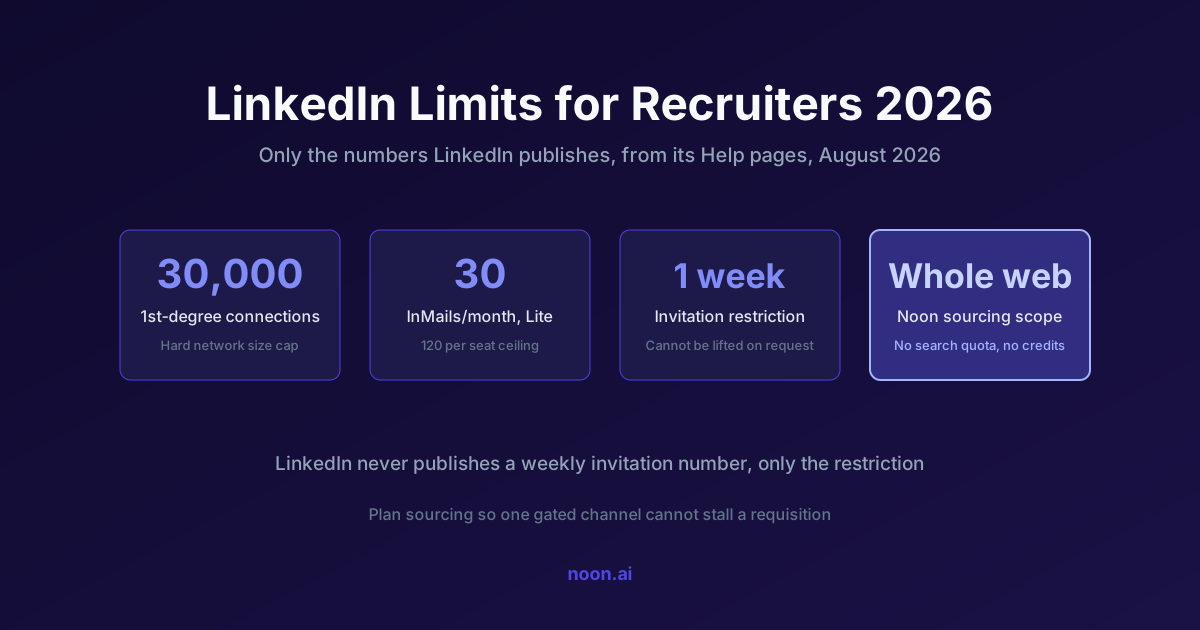
Key takeaway: LinkedIn documents four hard limits and deliberately hides the rest. Documented: a maximum of 30,000 first-degree connections per member, 30 InMail credits per month on Recruiter Lite with a hard ceiling of 120 InMails per seat, five personalized connection requests per month on free accounts (unlimited on Premium), and an invitation restriction that "typically lasts one week" when you send too many or have too many ignored (LinkedIn Help: types of restrictions, invitation limit reached, InMail credits and renewal, purchase additional InMail credits). Undocumented on purpose: the daily and weekly invitation numbers, and the exact commercial use limit, which LinkedIn says it cannot display or lift on request (commercial use limit). Any blog post quoting a precise weekly invite cap is quoting folklore, not LinkedIn.
Sourcing plans built on LinkedIn folklore break in predictable ways: a recruiter loses invitation privileges for a week in the middle of a search, a Recruiter Lite seat runs dry on InMail credits on day nine, or a hiring manager's free account hits the commercial use limit on the 14th of the month and cannot search until the 1st.
The fix is to separate what LinkedIn publishes from what the internet repeats. Everything in this article comes from LinkedIn's own Help pages, checked on 17 August 2026, with the gaps called out as gaps.
What limits does LinkedIn actually publish?
| Limit | Published value | Applies to | Source |
|---|---|---|---|
| First-degree connections | 30,000 maximum | All members | Types of restrictions |
| Personalized connection requests | 5 per month (free), unlimited (Premium) | All members | Invitation limit reached |
| Invitation restriction duration | Typically one week, most removed automatically within a week | All members, Basic and Premium | Types of restrictions |
| Re-inviting after withdrawal | Cannot resend to the same person for up to three weeks | All members | Types of restrictions |
| InMail credits per month | Premium Career 5, Premium Business 15, Sales Navigator Core 50, Recruiter Lite 30 | Per account type | InMail credits and renewal |
| Maximum InMail accumulation | Premium Career 15, Premium Business 45, Sales Navigator 150, Recruiter Lite 120, Hiring Pro 5 per job | Per account type | InMail credits and renewal |
| Extra InMail purchases | Packs of 10, maximum 70 extra per seat, contract cannot exceed 120 per seat | Recruiter Lite | Purchase additional InMail credits |
| Boolean operators per query | Capped on consumer search, unlimited in Recruiter and Recruiter Lite, maximum 15 in Sales Navigator | Per product | Boolean query limitations |
| Commercial use limit | Monthly, resets midnight PST on the 1st, exact number not disclosed, cannot be lifted on request | Free accounts (and Premium DACH Essentials) | Commercial use limit |
Two rows deserve emphasis because they contradict common advice. LinkedIn states plainly that it "currently" does not offer any subscription plan with unlimited InMail credits (InMail credits and renewal), so no amount of spend converts LinkedIn into an uncapped outreach channel. And LinkedIn confirms you cannot buy your way out of an invitation restriction: "You cannot buy or acquire more invitations while restricted" (invitation limit reached).
How many connection requests can a recruiter send per week?
LinkedIn does not publish a number. What it publishes is the trigger conditions and the consequence.
Your account can be restricted from sending invitations when you have "sent many invitations within a short amount of time" or when "many of your invitations have been ignored, left pending, or marked as spam by the recipients" (types of restrictions). If LinkedIn suspects automation behind an excessive volume of invitations, it may suspend or restrict the account outright, and repeated suspensions "may result in permanent restriction."
That wording tells you how to behave even without a number:
- Acceptance rate is a rate limit. Ignored and pending invitations are named as a restriction trigger, so a recruiter sending 50 well-targeted invitations with a high acceptance rate is safer than one sending 30 indiscriminate ones.
- Withdrawing does not help. "Withdrawing pending invitations will not remove the restriction," and after withdrawing you cannot re-invite that person for up to three weeks.
- Restrictions are opaque by design. LinkedIn Support "cannot disclose any additional information regarding the type or reason" and cannot shorten the wait.
- Third-party automation is an account risk, not a productivity hack. LinkedIn explicitly asks members to disable extensions that automate activity in violation of its User Agreement.
The practical takeaway for a sourcing plan: treat invitations as a scarce, quality-gated channel and put volume in channels where volume is permitted. That is the same conclusion the deliverability rules force on email, which we cover in recruiting email deliverability.
What is the commercial use limit and when does it hit?
The commercial use limit applies to free accounts and throttles profile search and profile viewing once your activity looks like hiring or prospecting. LinkedIn's page is unusually direct about the mechanics: the free monthly allowance resets at midnight PST on the 1st of each calendar month, LinkedIn is "not able to display the exact number of searches or views you have left," and it "cannot lift the limit upon request" (commercial use limit).
What counts toward it:
- Searching for LinkedIn profiles on the site or mobile app
- Browsing profiles through the "People Also Viewed" panel
- Viewing member profiles on the People tab of a LinkedIn Page
What does not count:
- Searching profiles by name in the top search box
- Browsing your own first-degree connections from the Connections page
- Searching for jobs on the Jobs page
Two edge cases matter for teams. Premium DACH Essentials plans still include the commercial use limit. And if you cancel a Premium subscription you drop back to the basic limit immediately, without a reset, so mid-month cancellations can leave a recruiter with no search capacity for the rest of the month.
How far do 30 InMail credits actually go?
Recruiter Lite gives 30 credits per month, renewed on the first day of your billing cycle rather than the calendar month (InMail credits and renewal). Three rules shape the real number of candidates you can reach.
Credits come back when candidates respond. Every InMail accepted, declined, or replied to within 90 days is credited back, and Quick Replies count as a response. Pending messages are not credited. Response rate therefore multiplies your effective capacity: at a 25% response rate, 30 credits behave more like 37 to 40 sends over a month.
You cannot follow up until they answer. LinkedIn blocks a second InMail to the same member until they respond, and sends an automatic reminder to the recipient within three days. Sequenced follow-up, the tactic that produces most replies in email, is simply unavailable on this channel.
The ceiling is 120 per seat. Extra credits are sold in packs of 10 up to 70 additional per seat, and a Recruiter Lite contract cannot exceed 120 InMails per seat. Worse, unused credits interact badly with renewal: with 115 credits remaining at renewal you receive only 5 of your monthly 30, and the other 25 are "skipped and non-recoverable" (purchase additional InMail credits). Hoarding credits destroys them.
For a single active role, 30 credits is roughly one week of serious sourcing. That is the arithmetic behind most upgrade conversations, and the reason to check what a full Recruiter seat costs before assuming it solves the problem: see our breakdown of LinkedIn Recruiter pricing and the feature-level differences in LinkedIn Recruiter AI features.
Which limits change if you upgrade?
| Constraint | Free | Premium Business | Recruiter Lite | Recruiter (full) |
|---|---|---|---|---|
| Commercial use limit on search | Yes | Lifted | Lifted | Lifted |
| InMail credits per month | 0 | 15 | 30 | Set by contract, not published |
| Personalized invitations | 5 per month | Unlimited | Unlimited | Unlimited |
| Boolean operators per query | Capped | Capped | Unlimited | Unlimited |
| Invitation limits and restrictions | Apply | Apply | Apply | Apply |
| Follow-up InMail before a reply | Not allowed | Not allowed | Not allowed | Not allowed |
Sources: commercial use limit, InMail credits and renewal, Boolean query limitations, invitation limit reached.
The row that never changes is the important one. Invitation limits and restrictions "apply to all LinkedIn members (Basic and Premium)," and the no-follow-up rule on InMail applies at every tier. Upgrading buys search capacity and credits, not permission to send more.
How do sourcing teams plan around limits they cannot see?
The design principle is simple: never let a single gated channel be the only path to a candidate.
- Build the candidate list outside LinkedIn's search quota. Sourcing across the open web, company sites, portfolios, and public profiles avoids the commercial use limit entirely and finds people whose LinkedIn profiles are dormant. See how to find candidates who are not on LinkedIn.
- Reserve InMail for candidates where it is the only channel. If you have a verified work or personal email, spend the email touch and keep the credit.
- Keep invitation volume proportional to acceptance rate. Track acceptance weekly, and cut targeting breadth before cutting volume.
- Assume a one-week outage. Plan searches so that losing invitations for a week on one seat does not stall a requisition.
At Noon, sourcing runs across the whole web rather than a single network: the agentic sourcer evaluates candidates against role-specific criteria, finds contact details, and hands them to multi-channel outreach over email and SMS. Because Noon is one unlimited plan with unlimited sourcing, contacts, agents, and seats, none of the arithmetic above applies to the searching and enrichment side of the work. See AI sourcer and AI outreach for what each part does, or the wider category comparison in best AI recruiting software. LinkedIn's own AI tooling is a narrower answer to the same problem, as we cover in LinkedIn Hiring Assistant versus AI sourcing.
Frequently asked questions
How does the platform avoid LinkedIn account flagging or bans? By respecting the documented rules rather than trying to beat them: no automated invitation blasting, no third-party scraping extensions, and invitation volume kept proportional to acceptance rate. LinkedIn's Help pages state that it may suspend or restrict accounts when it suspects automation tools behind excessive invitations, and that repeated suspensions can become permanent. Any vendor promising unlimited LinkedIn invitations is describing a risk, not a feature.
What is the LinkedIn weekly connection request limit in 2026? LinkedIn does not publish one. It publishes the triggers (too many invitations too fast, too many ignored or pending, suspected automation) and the consequence (a restriction that typically lasts one week). Numbers you see quoted elsewhere are community estimates, not policy.
Do unused InMail credits roll over? Partly, and with a penalty. Recruiter Lite accumulates up to 120 credits per seat, but if your balance is near that ceiling at renewal you receive only the difference, and the rest of that month's allotment is skipped and non-recoverable. Purchased credits do not expire on their own.
Does the commercial use limit reset if I cancel Premium? No. Canceling returns you to the basic search and profile browsing limit, and LinkedIn states your limit will not be reset upon cancellation. It resets at midnight PST on the 1st of the next calendar month like everyone else's.
Can I use Boolean strings on a free LinkedIn account? Yes, but the number of operators in a single query is capped on consumer search, which LinkedIn says is partly to deter profile scraping. Recruiter and Recruiter Lite have no operator cap; Sales Navigator allows a maximum of 15 per query.
Is it against LinkedIn's terms to use an AI sourcing tool? It depends entirely on how the tool works. Tools that automate activity inside LinkedIn or copy data from it in violation of the User Agreement put your account at risk, and LinkedIn asks members to disable them. Tools that search the open web and reach candidates through their own contact details operate outside that boundary, which is the design Noon uses.




