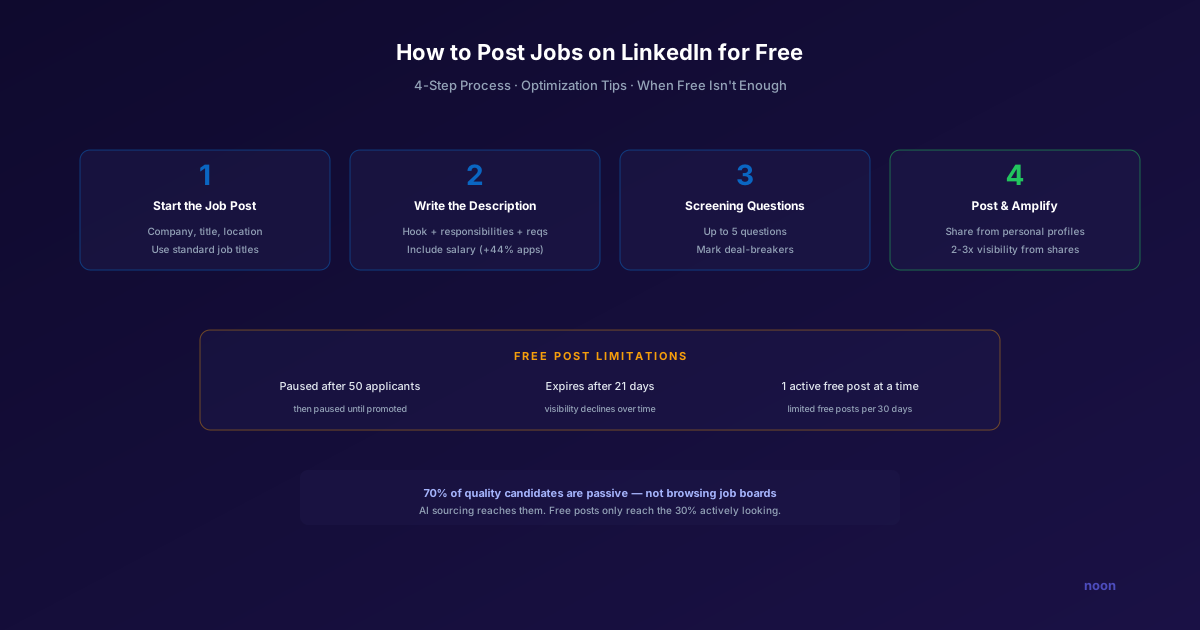
Key takeaway: LinkedIn lets you post 1 free job at a time for a maximum of 30 days, and free posts appear in non-promoted search results with limited visibility (LinkedIn Talent Solutions, read 7 October 2026). To get the most from a free post, use a standard searchable title, put the salary range in the post, keep screening questions to true deal-breakers, and share it from personal profiles in the first days. Treat the free post as one inbound channel and pair it with direct outreach to passive candidates.
LinkedIn free job posts are the most common free recruiting channel for professional roles, and one of the most misunderstood.
Here is what LinkedIn itself says about the free tier on its free vs. paid hiring tools page (read 7 October 2026):
- You can post 1 free job at a time.
- A free job runs for a maximum of 30 days.
- Free posts appear in non-promoted search results with limited visibility.
- Promoted jobs have no limit on how many run at once, get placement at the top of job search results, and are charged only for job views.
That is a tighter box than many older guides describe. For high-volume hiring, free posts alone will not fill the funnel. For a startup or small team hiring one or two roles at a time, a well-built free post can still produce a solid first applicant pool at zero cost.
How do you post a free job on LinkedIn, step by step?
Step 1: Start the job post
- Go to LinkedIn Jobs and sign in.
- Enter your company name and select it from the dropdown so the post links to your company page.
- Enter the job title. Pick LinkedIn's suggested standard title where one fits, because job seekers search by standard titles.
- Enter the location or mark the role remote or hybrid.
Tip: Update your company page first. Candidates check the logo, cover image, and About section before they apply, and an empty page reads as a risk.
Step 2: Write the job description and add skills
This is where most free posts fail. A generic description gets generic applicants.
What to include:
- Opening (2 to 3 sentences): What will this person build, solve, or own? Lead with the work, not company history.
- Responsibilities (5 to 7 bullets): Be specific. "Own the end-to-end data pipeline for our recommendation engine" beats "Work on data infrastructure."
- Requirements (3 to 5 must-haves): Only true non-negotiables. Every extra requirement shrinks the pool.
- Nice-to-haves (2 to 3): Things that strengthen a candidacy without being required.
- Compensation range: Include it. A growing list of US states and cities require pay ranges in job posts, and a range filters out mismatched expectations before anyone spends time on a call.
- Skills: Add the skills LinkedIn suggests that genuinely match the role, so the post is matched to the right members.
What to avoid:
- Company history paragraphs nobody reads
- Internal jargon and acronyms
- Filler like "must be a team player"
- Requirement lists that screen out qualified people
Step 3: Add screening questions
Screening questions are your first filter. Use them for deal-breakers only:
- "Do you have [X years] of experience with [specific skill]?"
- "Are you authorized to work in [country]?"
- "Are you able to work [on-site/hybrid/remote] in [location]?"
Mark the answers that should disqualify a candidate automatically so obvious mismatches do not reach your review queue. Keep the list short: every extra question costs completed applications.
Step 4: Post, then manage the applicants
Choose the free option when LinkedIn offers to promote the job. New job posters may also see a free trial for promoting their first job, which LinkedIn describes in its Post Jobs help center; decide on promotion after you see what the free post produces.
After posting:
- Review applicants within 24 to 48 hours. People who apply in the first days are usually actively watching new posts.
- Reply to every applicant, including rejections. Silence costs you with the next role you post. Our follow-up email benchmarks show how much timing matters.
- Share the post from your personal profile and ask the hiring manager and team to do the same.
- Try Hiring Pro if it is offered on your account. LinkedIn's help center describes it as a conversational assistant that works with you as you review applicants and refine must-have and preferred qualifications.
How do you get more from a free LinkedIn job post?
Because free posts sit in non-promoted results with limited visibility, most of your reach comes from the title and from people sharing the post.
Use a title people search for
| Instead of | Use |
|---|---|
| "Ninja Developer" | "Senior Software Engineer" |
| "Growth Hacker" | "Growth Marketing Manager" |
| "People Ops Guru" | "HR Manager" |
| "Client Success Champion" | "Customer Success Manager" |
Creative titles may reflect your culture, but nobody searches for them. Put personality in the first two lines of the description instead.
Use the full 30 days
A free post runs for at most 30 days. Post early in the work week so the first days of the window overlap with peak job-search activity, and do your sharing push in that first week rather than spreading it thin.
Lean on your network
Your network is the free tier's biggest advantage:
- Share from your personal profile with two or three sentences on why the role matters
- Ask the hiring manager to share it with theirs
- Ask teammates to comment on the shared post, which carries it into their networks
- Post it in relevant LinkedIn groups you already belong to
Know the one-post limit before you plan
With only one free job active at a time, decide which role gets the free slot. Give it to the role where your network is strongest, and use other channels for the rest.
When is a free LinkedIn job post not enough?
Promote the job when:
- The role is specialized and your network does not reach the right people
- Time to fill matters more than the cost of job views
- You are hiring for more than one role at once, since only one free post can run
- The free post is getting views but few relevant applicants after the first week
Add channels beyond LinkedIn when:
- You are hiring engineers: GitHub, developer communities, and specialist job boards often reach people LinkedIn posts miss
- You want a broader candidate mix: niche boards and professional associations reach different populations
- You are hiring hourly or frontline workers: Indeed and ZipRecruiter fit those roles better (see Indeed alternatives)
- Applications per post are falling: the same channel stops working when the same audience sees it every time
Add AI sourcing when:
- You need passive candidates who are not browsing job posts
- The role is specialized enough that inbound applications will not be enough
- You do not want your pipeline to depend on one network's posting rules
Every job post, free or paid, only reaches people who are looking. An AI sourcing agent such as Noon flips that: it searches across the whole web, not only LinkedIn, evaluates each profile against your role's criteria and non-negotiables, and starts personalized email and SMS outreach. It runs on one plan with unlimited sourcing, contacts, and seats (see Noon pricing). If you want to see how AI sourcing works alongside your free postings, you can book a demo to compare reach and candidate quality between the two approaches.
What does a multi-channel job posting plan look like?
| Channel | Cost | Best for | Candidate type |
|---|---|---|---|
| LinkedIn free post | Free, 1 job at a time, up to 30 days | One professional role your network can reach | Active job seekers |
| LinkedIn promoted job | Pay per job view | Broader reach, several roles at once | Active and semi-active |
| Company career page | Hosting cost | Employer brand and search traffic | Active and researching |
| Employee referrals | Referral bonus you set | Trusted, often passive candidates | Passive via a connection |
| Indeed / ZipRecruiter | Free and sponsored options | Volume and hourly roles | Active job seekers |
| AI sourcing (Noon) | Platform plan | Specialized roles and passive talent | Passive, not browsing jobs |
| Niche job boards | Varies by board | Domain-specific roles | Active in a specific field |
The free LinkedIn post is one piece. For most roles, combine two or three channels based on who you are trying to reach.
FAQ
How many free job posts can I have on LinkedIn at once? One. LinkedIn's free tier allows 1 free job at a time, running for a maximum of 30 days (LinkedIn Talent Solutions, read 7 October 2026). To run more roles at once you need promoted jobs or a LinkedIn Recruiter contract.
How long does a free LinkedIn job post stay up? Up to 30 days. After that, you can repost a closed or expired job, which LinkedIn's help center covers under Post Jobs.
Do free job posts actually work? Yes, within limits. They work best when your network has relevant connections, your company page is credible, and the role is in a common function. Because free posts get limited visibility in non-promoted results, they are weaker for specialized roles, passive candidates, or high applicant volume. A strong employer brand helps more on the free tier than on promoted posts.
Should I include salary in a free LinkedIn post? Yes. A growing number of US states and cities require a pay range in job posts, and even where it is optional, a range filters out candidates whose expectations do not match before anyone spends time on a call.
How does a free LinkedIn post compare to AI sourcing? They do different jobs. A free post is inbound: you post and wait for applicants. AI sourcing is outbound: it finds and contacts qualified people who are not applying anywhere. Most teams use both, with the free post catching active seekers and sourcing reaching the passive majority.




