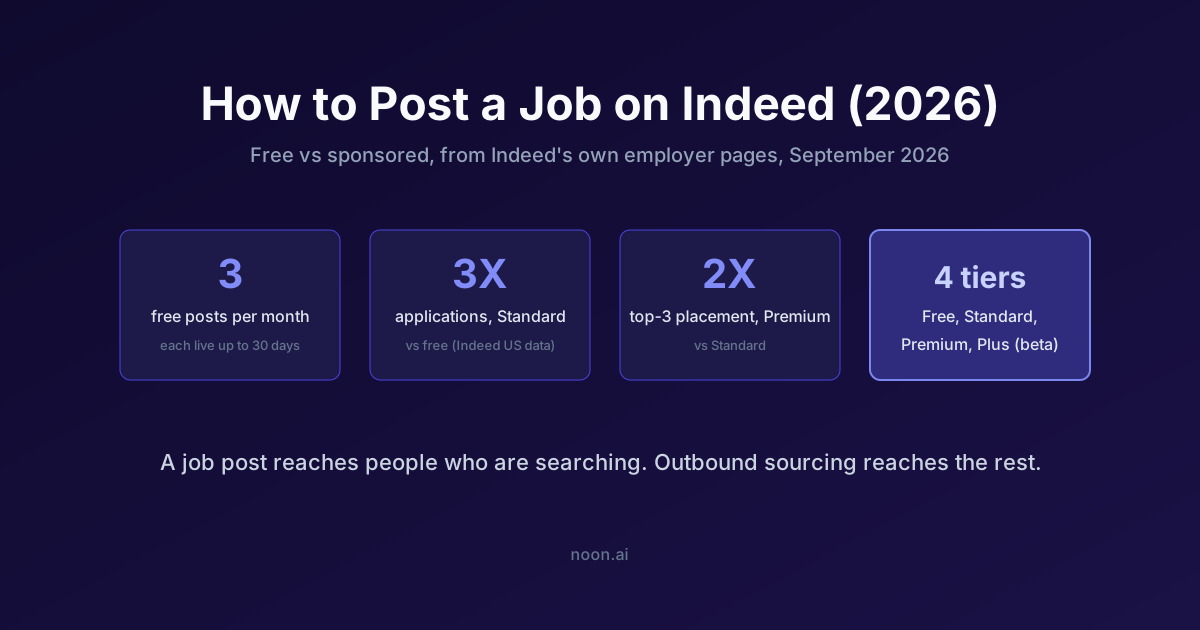
Key takeaway: Posting a job on Indeed takes four clicks from the employer dashboard, and many jobs can still be posted for free. Indeed's help center described the free allowance as up to three free jobs per calendar month, each live for up to 30 days when we checked on 7 September 2026; the October version of its pricing FAQ no longer prints a number and says only that free posts are "subject to Indeed's terms, conditions, quality standards, and usage limits" (Indeed pricing page, read 21 October 2026). Jobs fed from a career site, an XML or API feed, or an ATS may be sponsored-only. Indeed sells Free, Standard, Premium, and Premium Plus (beta), and its own US data claims Standard sponsored jobs get 3X more applications than free posts and Premium jobs appear in the top three results 2X as often. A job post, free or paid, only reaches people who are searching; the candidates who are not looking still need to be sourced and contacted directly.
Indeed is the largest job site in the United States by traffic, according to Similarweb's jobs-and-employment category ranking (similarweb.com/top-websites/jobs-and-career), which is why "post a job on Indeed" is usually the first thing a hiring manager does after a requisition is approved. The mechanics are simple. The judgment calls, free or sponsored, which tier, what to put in the screening questions, and what to do when the applicants are wrong for the role, are where most of the value is. This guide covers both.
Every Indeed claim below was re-read from Indeed's own employer pages on 21 October 2026, and where a page changed since our first check on 7 September 2026 we say what changed. Where Indeed publishes no number, this article says so rather than guessing.
How do you post a job on Indeed as an employer?
Indeed's documented flow, from its employer help center (Post a job on Indeed):
- Sign up for an employer account at indeed.com/hire, or sign in to an existing one. Use a company-domain email; Indeed verifies employer accounts and free-address signups are slower to clear.
- Open the employer dashboard. This is where every job, applicant, and message lives.
- Select Jobs from the left-hand menu.
- Click Post a job at the top right.
After you publish, Indeed's Trust & Safety team reviews the post, and it shows as "Pending" and stays out of search results until it is approved and you receive a confirmation email (Indeed Employer Help, read 21 October 2026). Allow for that delay when a role is urgent, and check that mail from do-not-reply@indeed.com is not going to spam.
From there Indeed walks you through a form: job title, location (on-site, hybrid, or remote), employment type, pay, a description, application settings, and optional screening questions. The last step asks whether you want to post for free or set a sponsored budget. You can change that choice at any time after publishing, so there is no penalty for starting free and sponsoring later if the applicant flow disappoints.
Two things Indeed's form does not tell you:
- The title field is a search query, not a headline. Indeed matches job seekers' searches against your title. "Senior Backend Engineer (Go, Kubernetes)" is found; "Rockstar Coder" is not. Searchable nouns beat internal branding, on Indeed and on every other board in our inbound vs outbound recruiting comparison.
- Pay is a ranking and conversion input. Indeed shows an estimated pay range when you leave the field blank. Publishing your real range removes the estimate and, in the growing list of US states with pay-transparency laws, is required anyway.
What do you get with a free Indeed job post?
Indeed's post-a-job page now leads with "Post a job for free* on Indeed" (Indeed for Employers), and the asterisk carries the terms: "usage limits apply," feature availability "may be limited," and the free offer "does not apply to staffing agencies." The free allowance is less specific than it was a month ago:
| Free post feature | 7 Sep 2026 | 21 Oct 2026 |
|---|---|---|
| Number of free jobs | Up to 3 per calendar month when posting directly | No number published; "usage limits apply" |
| Duration | Up to 30 days live | No duration published |
| Who is excluded | "Most jobs are eligible"; the rest sponsored-only | Staffing agencies excluded; jobs from a career site, XML/API feed or ATS may be sponsored-only |
| Visibility | Appears in search results | Appears in search results; no visibility boost |
| Included tools | Dashboard, messaging, screening questions | Indeed Apply, screening questions, analytics, message templates |
Treat the September limits as the practical ceiling until Indeed prints a new one, and check the posting screen itself, which Indeed says will show when a job is sponsored-only.
The practical translation: a free post is a 30-day test of inbound demand for a common role in a market with plenty of active job seekers. Roles like customer support, warehouse, admin, and sales development routinely fill from free posts. Roles where the qualified population is small and mostly employed, senior engineers, niche finance, specialist clinicians, rarely do, because the people you want are not running searches on Indeed this month.
If you are only ever hiring one or two roles at a time, the free allowance usually covers you. Once you have several concurrent openings, post through an ATS feed, or re-post the same role every month, plan on sponsoring. For boards that still publish an exact free limit, see our free job posting sites comparison.
Should you sponsor your Indeed job, and which tier?
Indeed sells four tiers on its pricing page. It does not publish a per-application price; it recommends a budget based on your job title, location, and description, and its FAQ says the minimum price "will depend on several factors, including available job seekers in your market" and competing posts. Indeed's own feature split and claims, from indeed.com/hire/pricing as read on 21 October 2026:
| Tier | What it adds | Indeed's published claim |
|---|---|---|
| Free | Listing in search, Indeed Apply, screening questions, analytics, message templates | None |
| Standard | Visibility boost, email advertising, job seeker feed, automated messages; you set the ad duration | 3X more applications than free |
| Premium | First page boost, advanced matching, matched candidates you can invite, Urgently Hiring label, brand promotion, SMS messages | 2X as often in the top 3 search results |
| Premium Plus (beta) | Everything in Premium plus an AI Recruiting Assistant: automated invites, application scores and summaries, license and certification gathering, AI follow-up questions | No performance figure published |
Indeed's post-a-job page adds three outcome claims for sponsored jobs, all Indeed US data: they are 60% more likely to report a hire than non-sponsored jobs, 2.6 times faster to first hire, and with Urgently Hiring they make a hire 5 days faster (Indeed for Employers, read 21 October 2026). Its citations date those figures to 2023 measurements, so read them as direction, not as this year's benchmark.
Read those claims for what they are: Indeed's measurements of Indeed's product, published to sell the product. They are still useful, because the relative ordering (Premium above Standard above Free) is what you are buying. What you cannot get from Indeed's page is the absolute cost, which depends on your role and market. Our Indeed pricing breakdown covers employer-reported per-application and monthly ranges and how the budget model bills.
A simple rule that holds up in practice:
- Start free when the role is common, the market is local, and you can wait a few weeks.
- Sponsor at Standard when a free post produced applicants but too few, or when you need the role filled inside a hiring deadline. SHRM's 2026 benchmarking puts median time-to-fill for nonexecutive roles at 39 days (SHRM Recruiting Benchmarking), so a month-long free test that fails has already cost you most of a normal cycle.
- Sponsor at Premium or Premium Plus when the role is competitive and you are losing candidates to other postings in the same search results. Placement in the top three is where most clicks go.
- Do not sponsor a role whose candidates are not active job seekers. More budget buys more of the same audience, not a different one.
How do you set up Indeed screening questions and the application flow?
Indeed offers two things at the application step that most employers under-use.
Screening questions. You can add deal-breaker questions (work authorization, licenses, shift availability, years in a specific skill) and mark them as required. Indeed flags or filters applicants who fail them. Use these for genuine non-negotiables only. Every extra question costs completion rate, and the same principle applies inside sourcing tools: Noon, for example, separates strict non-negotiables from weighted criteria so the hard filters stay small and the ranking does the rest.
Application destination. You can accept applications on Indeed or send candidates to your own applicant tracking system. Applying on Indeed keeps friction low (job seekers can apply with their Indeed resume); routing to your ATS keeps your data in one place. If your ATS integrates with Indeed, you usually get both. Most mainstream systems do; see our roundup of the best applicant tracking systems for which integrations each supports.
One more setting to check: application email notifications. The default sends an email per applicant. On a Standard sponsored post for a common role, that can be dozens a day. Switch to a daily digest and review in the dashboard instead.
How do you get your Indeed job to show up on Google?
Jobs posted on Indeed are also indexed by Google's job search feature, so you do not need to do anything for the Indeed listing itself. If you also post the job on your own careers page, add JobPosting structured data so Google can surface your direct listing too. Google's specification is public (Google Search Central, Job posting structured data) and most ATS career pages emit it automatically. That is free reach, and it sends applicants to you rather than through a job board.
What can an Indeed job post never do?
An Indeed post, at any tier, reaches people who are searching Indeed for a job like yours right now. Three groups it structurally misses:
- Employed people who are not looking. They are not on Indeed this month. For senior and specialist roles this is most of the qualified population.
- People who search for the role under a different title. Indeed's matching has improved, but a "Solutions Engineer" search does not reliably surface your "Technical Account Manager" post.
- People you have already spoken to. Previous applicants and silver-medalist candidates in your ATS will not see a new post unless they happen to search again.
The tool that covers group one from the Indeed side is Indeed Smart Sourcing, a paid resume database where you search and message candidates who have uploaded a resume. It is outbound rather than inbound, but it is still limited to people who put a resume on Indeed.
The broader fix is outbound sourcing across the open web. This is where an AI recruiter changes the economics of a job post. Noon's AI Sourcer searches for candidates across the web rather than one database, evaluates each against the role's criteria, and re-ranks as hiring-manager feedback comes in. Its AI Outreach then contacts the ranked candidates over email and SMS with personalised sequences, and the AI Scheduler books the resulting interviews. One plan covers unlimited sourcing, contacts, and seats, with no per-application meter, so the cost does not scale with the number of roles the way a sponsored job board budget does. Noon does not publish a dollar price; pricing is quoted per team.
The sensible pattern for most teams is both channels at once: a free or Standard Indeed post to capture the active market, and outbound sourcing running in parallel for the passive one. Compare that with the trade-offs in our Indeed alternatives guide and the ZipRecruiter vs Indeed comparison if you are deciding where the inbound side should live.
Frequently asked questions
Is it really free to post a job on Indeed?
Yes, for many jobs. Indeed's pricing FAQ (read 21 October 2026) says "many jobs can be posted for free, subject to Indeed's terms, conditions, quality standards, and usage limits," and that jobs aggregated from a career site, published from an XML or API feed, or published from an ATS may be sponsored-only. In September 2026 its help center put the limit at three free jobs per calendar month, each live up to 30 days; the October pages no longer print a number. The free offer does not apply to staffing agencies.
How long does an Indeed job post stay up?
Indeed's September 2026 help article said a free post stays live for up to 30 days; the October pages no longer state a duration. Sponsored posts stay live for the ad duration you set and the budget you run; you can pause or cancel them at any time.
Why is my Indeed job post stuck on "Pending"?
Every new post is reviewed by Indeed's Trust & Safety team before it appears in search. Until approval the status reads "Pending" and the job is invisible to job seekers; approval triggers a confirmation email from do-not-reply@indeed.com. A post marked "Flagged" failed review and needs editing before it will show.
How much does it cost to sponsor a job on Indeed?
Indeed does not publish a fixed price. It recommends a budget based on your title, location, and description, and bills against that budget as applications arrive. For the employer-reported cost ranges and how the four tiers differ, see our Indeed pricing guide.
Can I post a job on Indeed without a company?
Indeed requires an employer account with a verifiable business. Individuals hiring household help or contractors can post, but expect verification steps, and some categories are restricted or sponsored-only.
Why is my Indeed job post not getting applicants?
The usual causes, in order: an unsearchable title, no pay range, a location or schedule the local candidate pool cannot meet, a free post being outranked by sponsored ones, or a role whose qualified candidates are simply not active job seekers. The first four are fixable inside Indeed. The fifth needs outbound sourcing.
Does Indeed post my job to other sites?
Indeed listings are indexed by Google's job search feature and appear on Indeed's own network. It does not syndicate to LinkedIn or ZipRecruiter; post separately there. Our guide to posting jobs on LinkedIn for free covers that flow.
Sources
- Indeed for Employers, Post a job for free: https://www.indeed.com/hire/post-job (read 7 September and 21 October 2026)
- Indeed Employer Help, Posting a Job Directly on Indeed: https://www.indeed.com/help/employers/articles/205846516 (read 7 September and 21 October 2026)
- Indeed for Employers, Sponsored Job plans and FAQ: https://www.indeed.com/hire/pricing (read 7 September and 21 October 2026)
- SHRM, 2026 Talent Trends: Recruiting Benchmarking: https://www.shrm.org/topics-tools/research/recruiting-benchmarking/full-data-brief
- Similarweb, Top websites: Jobs and Career: https://www.similarweb.com/top-websites/jobs-and-career/
- Google Search Central, Job posting structured data: https://developers.google.com/search/docs/appearance/structured-data/job-posting




