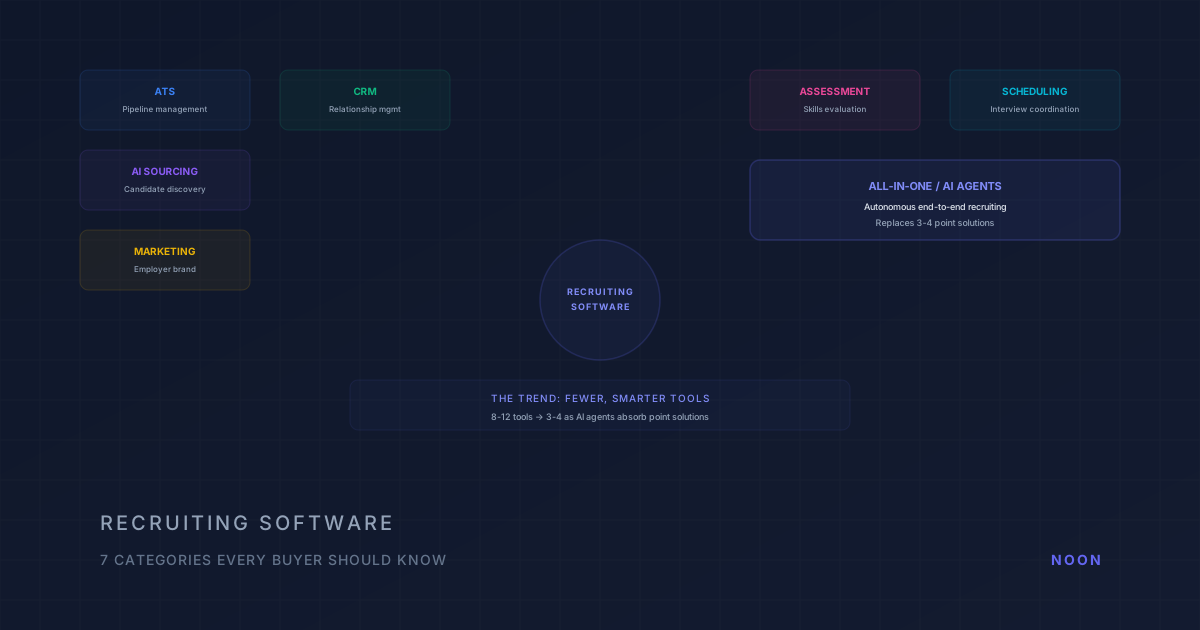
Key takeaway: The seven types of recruiting software are: ATS (workflow management), CRM (relationship management), AI sourcing (candidate discovery), recruitment marketing (employer brand), assessment platforms (skills evaluation), scheduling tools (interview coordination), and all-in-one suites. Most teams need an ATS + one specialized tool. The optimal stack depends on your hiring volume, team size, and biggest bottleneck.
The recruiting software market in 2026 is simultaneously mature and chaotic. Some categories are well-established: applicant tracking systems have been around for decades. Others are emerging: AI recruiting agents barely existed three years ago. And every vendor in every category now claims to be "AI-powered," making it genuinely difficult to understand what you're buying. Gartner calls the pattern "agent washing" and predicts that over 40% of agentic AI projects will be canceled by the end of 2027 for unclear value or weak risk controls (Gartner research reported by Reuters, June 2025). For a broader overview of recruiting tools and how they fit together, see our guide to recruiting tools.
The challenge for most TA leaders isn't a shortage of options. It's knowing which category of software addresses their actual problem. Buying an ATS when your issue is sourcing doesn't help. Buying a sourcing tool when your issue is pipeline management doesn't help. And buying an all-in-one platform when you only need better scheduling adds complexity without value.
This guide maps the seven distinct categories of recruiting software in 2026, explains what each one actually does (and doesn't do), and provides a framework for building a stack that fits your team without creating the tool sprawl that plagues most recruiting operations.
The seven types at a glance
| Type | Core job | Who operates it | Finds passive candidates? | Typical pricing model |
|---|---|---|---|---|
| ATS | System of record for applicants and pipelines | Recruiters, hiring managers | No | Per user or per employee, annual |
| Recruiting CRM | Relationships with prospects between reqs | Sourcers, recruiters | No (manages ones you already found) | Per user; enterprise custom |
| AI sourcing tools | Discover and (increasingly) engage candidates | Recruiter runs searches, or an agent runs the role | Yes | Per user, credits, or unlimited plan |
| Recruitment marketing | Employer brand, career site, job advertising | TA marketing | No (attracts applicants) | Platform fee or media spend |
| Assessment and screening | Validate skills before interviews | Recruiters, hiring managers | No | Per assessment or annual license |
| Interview scheduling | Coordinate interviewer and candidate calendars | Coordinators | No | Per user; often bundled |
| All-in-one / AI agents | Run several stages as one workflow | An agent, with recruiter direction | Yes | Custom or single plan |
The column that matters most for buyers in 2026 is "who operates it." Six of the seven categories are tools a person drives; the seventh is an agent given a goal. The difference is explained in what is an AI hiring agent.
Category 1: Applicant Tracking Systems (ATS)
What it does: An ATS is the foundational layer of recruiting technology. It manages job postings, incoming applications, candidate pipelines, interview scheduling, and offer management. Think of it as the system of record, the place where every candidate's journey through your hiring process is tracked.
Key players: Greenhouse, Lever, Ashby, Workday Recruiting, iCIMS, SmartRecruiters, JazzHR, BambooHR
When you need it: Always. Every team hiring more than a handful of people per year needs an ATS. It's the baseline.
What it doesn't do: An ATS is reactive: it manages candidates who come to you (applicants). It doesn't help you find candidates proactively. It doesn't evaluate candidate quality beyond basic knockout filters. And it doesn't handle outreach to passive candidates.
Pricing: Pricing varies by vendor, user count, modules, and contract. Compare the published rate card where one exists, then request a quote that spells out seats, credits, integrations, and implementation.
The trend: ATSs are adding AI features (resume parsing, interview scheduling, candidate scoring) but these tend to be lightweight compared to purpose-built AI tools. The most successful approach is a strong ATS as the foundation with specialized tools layered on top.
Category 2: Recruiting CRM
What it does: A recruiting CRM manages long-term relationships with candidates, not just active applicants, but passive prospects, silver medalists, referrals, and future fits. It handles nurture campaigns, talent pools, engagement tracking, and pipeline intelligence.
Key players: Gem, Beamery, Phenom, Avature, Bullhorn (for staffing), Recruit CRM
When you need it: When you actively source passive candidates, want to maintain relationships between reqs, or hire for recurring roles and need a talent pool strategy.
What it doesn't do: A CRM doesn't manage the active hiring process (that's the ATS). It doesn't autonomously find new candidates (that's sourcing). Some CRMs include basic sourcing features, but those are recruiter-operated search or enrichment tools, not autonomous agents that run the workflow independently. Their core value is relationship management.
Pricing: Mid-market and enterprise CRM pricing is commonly quote-based. Ask whether the proposal meters seats, contacts, sends, enrichment, or modules.
The distinction from ATS: An ATS tracks what happens after a candidate applies. A CRM manages what happens before and between applications. Nearly every organization has an ATS; far fewer run a CRM, which is why so many teams lose track of past candidates and silver medalists. Our recruiting CRM features checklist covers what to look for, and ATS vs CRM for recruiters goes deeper on the split.
Category 3: AI Sourcing Tools
What it does: AI sourcing tools find candidates proactively, searching professional databases, LinkedIn, GitHub, and other sources to identify people who fit specific role requirements. The best ones go beyond search to evaluate candidates and initiate outreach.
Key players: Noon, SeekOut, hireEZ, Eightfold.ai, Fetcher, Entelo, GoPerfect
When you need it: When inbound applications don't produce enough qualified candidates. When you're hiring for specialized or senior roles where the best candidates aren't actively looking. When you want to reduce agency dependency.
What it doesn't do: Basic sourcing tools find candidates but don't manage relationships over time. They're typically point-in-time: search, find, contact. More advanced platforms like Noon blur this line by handling sourcing, screening, outreach, and ongoing calibration as an autonomous workflow.
The evolution: This category has shifted from search tools (recruiter enters Boolean queries) to autonomous agents (recruiter activates a role, AI handles the rest). The distinction matters because search tools still require significant recruiter time, while agents operate independently.
Pricing: Published entry points vary by vendor and contract. Use the linked Juicebox pricing guide, SeekOut pricing guide, and hireEZ pricing guide for dated competitor research, and ask about credit or contact-reveal meters. Noon is different in structure: one plan with unlimited sourcing, contacts, agents, and seats, with no published dollar price (pricing).
The outreach question: Sourcing without follow-up is a list, not a pipeline. Across 844,234 recruiting sequences measured on the Noon platform, 65% of candidate replies arrived after the first message (Noon outreach benchmarks), so check whether a sourcing tool sequences and stops on reply or just sends one email. Our guide to automating recruiting outreach lists what to test.
Category 4: Recruitment Marketing
What it does: Recruitment marketing platforms manage your employer brand: career sites, job advertising, social media, employee advocacy, and talent attraction. They're the equivalent of marketing automation but for talent acquisition.
Key players: Phenom (career site + CRM), Appcast (programmatic job advertising), Clinch, Rally, SmashFly
When you need it: When your career site is outdated, your employer brand is weak, or you're spending heavily on job board posting without tracking ROI. Particularly valuable for high-volume employers who need to attract a steady stream of applicants.
What it doesn't do: Doesn't manage the application process (ATS). Doesn't source passive candidates (sourcing tools). Recruitment marketing brings people to your door; other tools manage what happens after they knock.
Pricing: Career-site and advertising proposals vary by traffic, media spend, integrations, and contract. Separate platform fees from job-advertising spend when comparing options.
Category 5: Assessment and Screening
What it does: Assessment platforms evaluate candidates through structured skills tests, coding challenges, personality assessments, cognitive ability tests, and video interviews. They provide objective data points beyond what a resume reveals.
Key players: HackerRank, Codility (technical assessment), HireVue (video interview + assessment), Criteria Corp, TestGorilla, Paradox/Olivia (conversational screening)
When you need it: When you want to validate skills before interviews. When you're hiring for technical roles and need to assess coding ability. When you want to reduce bias by adding standardized evaluation criteria.
What it doesn't do: Doesn't find candidates (sourcing). Doesn't manage relationships (CRM). Assessment is one step in the process, not the whole process.
Pricing: Assessment vendors may charge per candidate, by package, or through an annual license. Ask for the total cost at your expected candidate volume.
Category 6: Interview Scheduling
What it does: Automates the back-and-forth of scheduling interviews: matching interviewer availability, sending calendar invites, managing reschedules, coordinating panel interviews, and handling time zone conversions.
Key players: GoodTime, Calendly (for recruiting), ModernLoop, Prelude (acquired by Calendly), built-in ATS scheduling
When you need it: When scheduling coordination consumes significant recruiter time. When panel interviews with multiple interviewers create scheduling complexity. When candidates drop out because scheduling takes too long.
What it doesn't do: Pure scheduling tools don't manage other parts of the recruiting process. They solve one specific problem well.
Pricing: Scheduling is often bundled with an ATS or quoted by seats, interviewer volume, or workflow scope. Ask what happens when panel complexity increases.
Note: This category is increasingly absorbed into ATS and all-in-one platforms. Standalone scheduling tools are most valuable when your ATS's native scheduling is inadequate.
Category 7: All-in-One / AI Recruiting Agents
What it does: Platforms that combine multiple categories (sourcing, screening, outreach, CRM, and ATS integration) into a single system. The latest generation uses agentic AI to operate autonomously across the recruiting workflow.
Key players: Noon, Pin, Ashby (ATS + CRM), Phenom (career site + CRM + internal mobility), Workday (HRIS + ATS + everything)
When you need it: When your current stack is fragmented across too many tools. When you want to reduce the manual work of connecting sourcing to screening to outreach to ATS. When you'd rather have one integrated system than five best-of-breed point solutions.
What sets Noon apart: Most "all-in-one" platforms are actually multi-feature platforms: they have sourcing features, screening features, outreach features, etc. that a recruiter operates. Noon's approach is different: it's an autonomous agent that operates the entire sourcing-to-outreach workflow independently. The recruiter provides direction and feedback; the AI handles execution. Teams evaluating this category can book a demo to see how autonomous recruiting agents compare to traditional multi-tool stacks.
Pricing: All-in-one pricing varies by scope and contract. Enterprise platforms are usually quote-based. Noon has one plan with unlimited sourcing, contacts, agents, and seats, and no published dollar price, so use the pricing page for the current quote-based details.
What should a buyer test before signing?
Run one role or requisition through the proposed workflow and record four handoffs:
- Trigger: What starts the work, and can a recruiter give the system a clear role brief?
- Decision: Which criteria are enforced, and can the team inspect why a candidate passed or failed?
- Action: Does the system source, contact, screen, or schedule without a person restarting each step?
- System of record: Which candidate fields and events write back to the ATS?
For Noon, the relevant capability pages are AI sourcing, email and SMS outreach, AI scheduling, inbound screening, and ATS search.
How should you build your recruiting tech stack?
Approach 1: Best-of-breed
Buy the top tool in each category and integrate them.
- Pros: Best capabilities in each area
- Cons: Integration overhead, data fragmentation, expensive, complex
- Best for: Enterprise teams with dedicated recruiting ops/engineering
Approach 2: Platform + point solutions
Choose a strong ATS as the foundation, add 1-2 specialized tools for your biggest gap.
- Pros: Manageable complexity, strong foundation, targeted investment
- Cons: Still some integration work, potential overlap
- Best for: Mid-market teams (10-50 recruiters) with clear pain points
Approach 3: AI-native all-in-one
Choose a platform that handles sourcing, screening, and outreach autonomously, integrated with your ATS.
- Pros: Minimal tool sprawl, autonomous operation, unified data
- Cons: Newer category with fewer proven platforms, less customization
- Best for: Teams that want maximum automation with minimum operational overhead
Is recruiting tech consolidating or fragmenting?
SHRM's 2026 benchmarking of more than 4,600 organizations found extra-large employers saw a 67% increase in median requisitions per recruiter (SHRM 2026 Recruiting Executives Benchmarking). That pressure makes tool count and handoff quality worth reviewing. Teams consolidate because:
- Integration fatigue. Every new tool requires integration, maintenance, and training
- Data fragmentation. Candidate data split across tools makes reporting and analytics unreliable
- AI obsoletes point solutions. An AI agent that sources, screens, and reaches out can reduce the need for separate sourcing, screening, and outreach tools
- Budget pressure. Eight per-seat tools at a few hundred dollars a month each is tens of thousands of dollars per recruiter per year before anyone counts the integration and admin time. A platform that replaces four of them saves money and attention
The future of recruiting software isn't more tools; it's fewer, smarter ones that handle more of the workflow autonomously.
Frequently asked questions
What type of recruiting software should I buy first? An ATS; it's the foundation everything else builds on. If you already have an ATS, the next investment depends on your biggest pain point: sourcing (AI sourcing tool), relationship management (CRM), or both (all-in-one agent).
How many recruiting tools does a team really need? Start with the ATS and add only the category that addresses your clearest bottleneck; an agentic platform can cover several adjacent stages when that operating model fits. An all-in-one AI agent can reduce this to 2: ATS + AI agent. Fewer tools means less complexity, better data quality, and lower total cost.
Should I replace my ATS or add tools on top? Add on top, unless your ATS is so bad that it's actively hurting your process. ATS migrations can be disruptive and require careful data, workflow, and integration planning. Adding AI sourcing or a CRM on top of your existing ATS is much faster and less disruptive.
Are AI recruiting agents replacing traditional recruiting software? Partially. AI agents are absorbing the functions of sourcing tools, outreach sequencers, and basic screening tools into a single autonomous system. ATSs and assessment platforms are likely to remain separate categories, but the number of tools in the average stack will decrease as AI agents take over more of the workflow.
How do I tell an AI recruiting agent from an ATS or CRM with AI features added? Ask which steps the product owns without a person triggering them. An ATS or CRM with AI drafts messages, summarizes resumes, or suggests candidates inside the recruiter's workflow; the recruiter still initiates each action. An agent is given a role and runs sourcing, evaluation, outreach, and follow-up itself, with the recruiter calibrating from feedback. Ask for a live demo on one of your open reqs and count how many times someone has to click.
Which type of recruiting software integrates with my ATS? All of the other six categories should, and the quality of that integration is usually the deciding factor. Check that the tool writes candidates and activity back to the ATS record (not just reads from it) and how it handles candidates already in your system, which is the integration question buyers raise most often in our conversations. Noon's integration layer covers 20+ ATS providers; see the integrations page for the current list.




