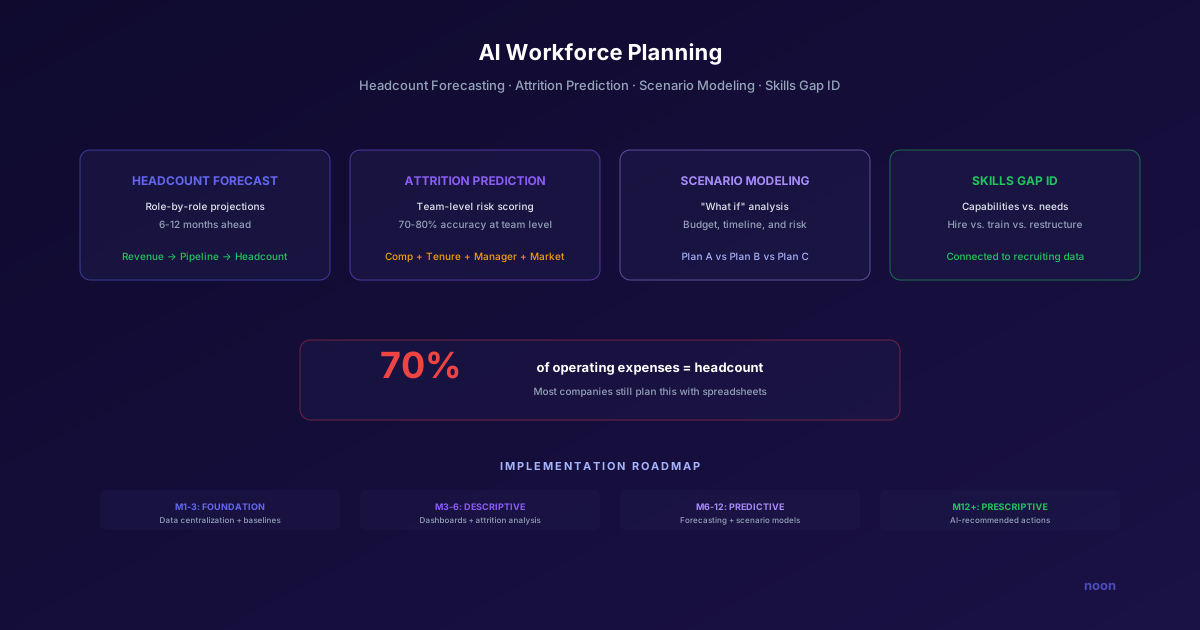
Key takeaway: AI workforce planning connects business data to people data, forecasting hiring needs 6-12 months ahead with 70-80% accuracy. It replaces spreadsheet-based headcount planning with ML models that factor in attrition predictions, growth scenarios, skills gap analysis, and market conditions. Companies using AI workforce planning reduce emergency hiring by 40% and align recruiting capacity with actual demand.
Every year, leadership asks HR the same question: "How many people do we need to hire next year?"
And every year, the answer comes from a spreadsheet. Someone pulls last year's headcount, adds a growth assumption, subtracts estimated attrition, and arrives at a number. The number goes into the budget. Six months later, it's wrong.
It's wrong because traditional workforce planning is reactive. It looks backward, applies crude assumptions, and ignores the signals that actually predict workforce needs. When headcount represents 70% of total operating expenses (the standard benchmark across knowledge-work industries), planning it with last year's data and a spreadsheet is the equivalent of navigating with last year's map.
AI workforce planning replaces the spreadsheet with a system that connects business data to people data — forecasting headcount needs by role and quarter, predicting attrition before it happens, modeling hiring scenarios against budget and targets, and identifying skills gaps before they become bottlenecks.
Why traditional workforce planning fails
Traditional workforce planning isn't planning. It's budgeting with job titles.
Problem 1: It's reactive. By the time you know you need 10 more engineers, projects are already delayed. Traditional planning detects needs after they become problems.
Problem 2: It treats headcount as static. Annual plans assume the world stays constant for 12 months. In reality, a product launch, a competitor move, or an economic shift can change headcount needs within weeks.
Problem 3: It ignores attrition signals. Traditional planning estimates attrition as a flat percentage ("assume 15% turnover"). But attrition isn't uniform — it varies by team, tenure, manager quality, compensation competitiveness, and dozens of other factors that a flat percentage can't capture.
Problem 4: It disconnects from business outcomes. The question shouldn't be "how many people do we need?" but "what capabilities do we need to achieve our business targets, and what's the most efficient way to acquire them?"
Problem 5: It creates the hiring-freeze-then-panic cycle. Under-planning leads to hiring freezes (because you over-hired in the wrong areas), followed by panic hiring (because now you're understaffed in critical areas). This cycle — repeated annually at many organizations — is a direct consequence of imprecise planning.
What AI workforce planning actually does
AI workforce planning uses machine learning to perform four functions that spreadsheets can't:
1. Headcount forecasting
AI models ingest multiple data streams — revenue projections, sales pipeline, product roadmap milestones, customer growth rates, seasonal patterns — and forecast headcount needs by role family, team, and quarter.
The difference from spreadsheet forecasting: AI can model non-linear relationships. For example, a 20% increase in customer count might require a 30% increase in support headcount (because larger customers require more support) but only a 10% increase in engineering headcount (because the platform scales). A spreadsheet applies the same growth assumption to both.
Example: A SaaS company's AI workforce model predicted that achieving their Q3 revenue target required adding 3 senior account executives by April (to allow for ramp time), 2 solutions engineers by March (to support the new AEs), and 1 additional CSM by June (to handle the projected onboarding volume). The model accounted for historical ramp curves, quota attainment patterns, and customer-to-CSM ratios that a simple headcount projection would miss.
2. Attrition prediction
AI analyzes dozens of signals to predict which teams and individuals are at highest attrition risk:
- Compensation competitiveness: How does each employee's pay compare to current market rates?
- Tenure patterns: When do employees at each level typically start looking? (The 18-month and 3-year marks are common inflection points.)
- Manager quality signals: Teams with low engagement scores or high prior turnover are higher risk.
- Market conditions: When external demand is high for a specific skill set, attrition risk increases.
- Engagement data: Survey responses, participation in company events, learning platform activity.
The output isn't "expect 15% turnover." It's "the platform engineering team has a 35% probability of losing 2-3 senior engineers in Q3, driven by below-market compensation and high external demand for Kubernetes expertise."
This specificity lets you act before people leave — whether through compensation adjustments, retention conversations, or pre-emptive backfill sourcing.
3. Scenario modeling
AI workforce planning models "what if" scenarios that would take days to build in a spreadsheet:
- "What if we launch the AI product line 3 months early? What additional headcount do we need and when?"
- "What if we cut the Q4 hiring budget by 20%? Which roles should we cut and which should we protect?"
- "What if attrition increases to 25% in engineering? What's the impact on product delivery?"
- "What if we shift from hiring 10 junior engineers to 4 senior engineers? What's the net impact on productivity?"
Each scenario produces specific headcount plans, budget implications, and risk assessments — enabling faster, better-informed decisions.
4. Skills gap identification
Rather than planning by headcount alone, AI maps the skills your organization needs against the skills it currently has (and is projected to have, given attrition and planned hiring).
This shifts the conversation from "we need 5 more engineers" to "we need 3 people with ML deployment experience, 1 with data pipeline architecture skills, and 1 with frontend performance optimization expertise — and we can train 2 existing engineers in ML deployment to partially close the gap."
The AI workforce planning tech stack
Several categories of tools support different aspects of workforce planning:
Strategic workforce planning platforms
These are the dedicated systems for building and managing workforce plans:
| Platform | Focus | Best For |
|---|---|---|
| Orgvue | Organizational design + workforce planning | Large enterprises with complex org structures |
| Visier | People analytics + workforce planning | Data-driven HR teams that want analytics-first |
| Anaplan | Financial planning with workforce modules | Companies that want workforce planning integrated with FP&A |
| Eightfold AI | Talent intelligence + planning | Companies that want skills-based workforce planning |
| Workday Adaptive Planning | Workforce planning for Workday customers | Workday-native organizations |
AI recruiting tools that inform planning
The connection between workforce planning and recruiting execution is critical. The best plans fail if you can't actually hire the people you've projected.
AI recruiting tools provide feedback loops that improve planning accuracy:
- Sourcing difficulty data: How hard is it to find candidates with specific skills in specific markets? This informs whether a "hire 5 ML engineers in 3 months" plan is realistic.
- Time-to-fill benchmarks: Historical data on how long it takes to fill different role types helps calibrate hiring timelines.
- Market intelligence: What's the talent supply for critical skills? What compensation levels are needed to be competitive?
Noon's autonomous recruiting generates this data as a byproduct of its sourcing activity. As the AI searches for candidates, it collects market intelligence — how many qualified candidates exist, how responsive they are, what compensation levels they expect — that feeds directly back into workforce planning accuracy. If you're building a workforce planning process that depends on reliable recruiting data, you can book a demo to see how Noon's market intelligence integrates with forecasting models.
The integration challenge
The biggest challenge in AI workforce planning isn't the AI — it's the data integration. Useful workforce planning requires connecting:
- HRIS data: Current headcount, org structure, compensation, tenure
- Finance data: Revenue projections, budget allocations, cost models
- Business data: Sales pipeline, product roadmap, customer metrics
- Recruiting data: Time-to-fill, sourcing difficulty, candidate pipeline health
- Market data: Compensation benchmarks, talent supply, competitive intelligence
Most organizations have these data sources in different systems that don't talk to each other. The first step in AI workforce planning is often a data integration project — not an AI project.
How do you implement AI workforce planning?
Phase 1: Foundation (Month 1-3)
Goal: Centralize data and establish baseline metrics.
- Audit existing headcount data for accuracy
- Connect HRIS to finance systems (or at minimum, establish a shared data model)
- Calculate baseline metrics: current attrition rate by team, average time-to-fill, cost per hire, hiring plan accuracy from prior years
- Identify the 3-5 most critical workforce planning questions (e.g., "Where will we have skills gaps in 12 months?")
Phase 2: Descriptive analytics (Month 3-6)
Goal: Understand current workforce composition and trends.
- Build dashboards showing workforce composition by team, function, level, tenure, and skills
- Analyze historical attrition patterns to identify drivers
- Map current skills inventory against strategic needs
- Begin tracking recruiting funnel metrics to build forecasting data
Phase 3: Predictive modeling (Month 6-12)
Goal: Forecast needs and model scenarios.
- Implement attrition prediction models
- Build headcount forecasting models connected to business metrics
- Create scenario modeling capability for leadership decision-making
- Integrate recruiting data for sourcing feasibility analysis
Phase 4: Prescriptive planning (Month 12+)
Goal: AI-recommended actions for workforce optimization.
- Model recommends specific hiring actions (who to hire, when, at what cost)
- Automated alerts when workforce plan deviates from actual (early warning system)
- Skills-based planning recommendations (hire vs. train vs. restructure)
- Continuous learning from plan accuracy to improve future forecasts
FAQ
How is AI workforce planning different from headcount budgeting? Headcount budgeting answers "how many people can we afford?" AI workforce planning answers "what capabilities do we need to achieve our business targets, and what's the most efficient way to acquire them?" Budgeting is a financial constraint. Planning is a strategic capability.
What data do we need to get started? At minimum: current headcount data (from HRIS), historical attrition data (2-3 years), and business targets (revenue goals, product milestones). More data improves accuracy, but you can start with basics and add complexity over time.
How accurate are AI attrition predictions? Typical models achieve 70-80% accuracy at the team level (predicting which teams will experience higher-than-average attrition) and 60-70% at the individual level. Accuracy improves with more data and longer training periods. Even 70% accuracy is dramatically better than flat-percentage assumptions.
Does AI workforce planning replace HR judgment? No. AI provides better data and forecasts. HR leaders still make the strategic decisions — which roles to prioritize, how to balance hiring vs. training, how to sequence workforce changes against business timelines. The AI makes the judgment better-informed, not unnecessary.




