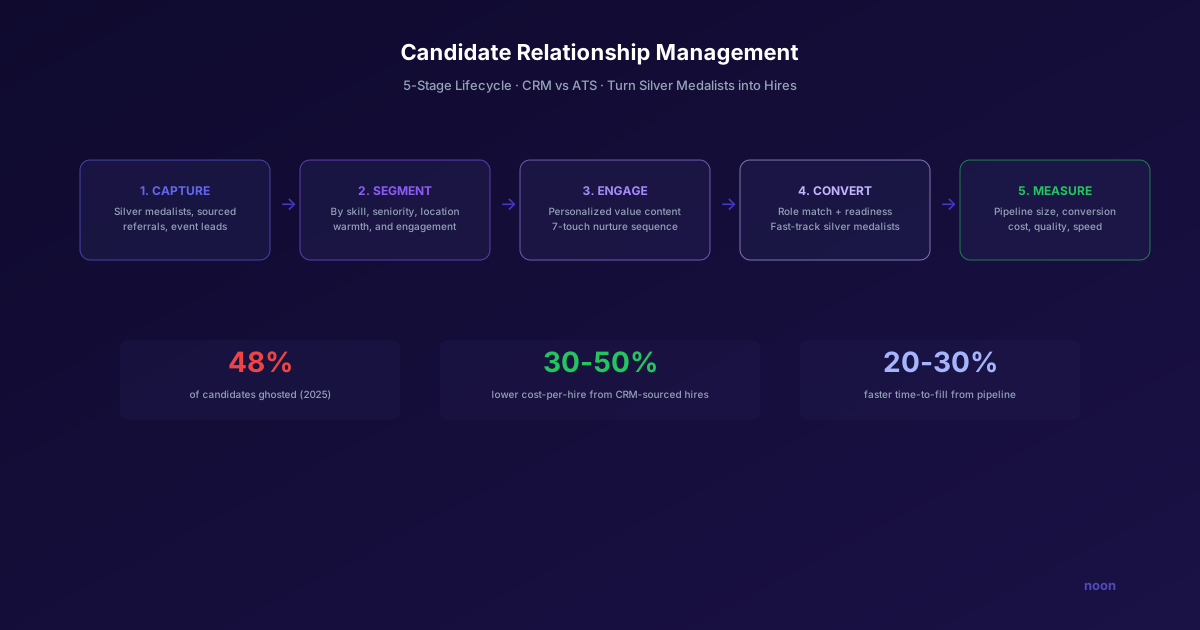
Key takeaway: 48% of candidates were ghosted by employers in 2025, while 69% of employers can't fill roles — the disconnect is a candidate relationship management problem. Effective CRM follows a five-stage lifecycle: Capture (centralize every touchpoint), Segment (by skills, seniority, engagement), Engage (automated nurture sequences), Convert (role-specific re-activation), and Measure (pipeline health metrics). Teams with active CRM programs fill roles 20-30% faster.
Key takeaways:
- 48% of candidates were ghosted by employers in 2025 (Criteria Corp) while 69% of employers can't fill roles (SHRM 2025) — a relationship-management gap.
- A CRM nurtures passive talent over months-to-years; an ATS processes active applicants over days-to-weeks — you need both.
- Effective CRM follows a five-stage lifecycle: Capture, Segment, Engage, Convert, and Measure.
- Teams with active CRM programs fill roles about 20-30% faster.
Here's the paradox at the center of modern recruiting: 69% of employers struggle to fill full-time positions (SHRM 2025 Talent Trends), while 48% of candidates were ghosted by those same employers (Criteria Corp 2026 Candidate Experience Report, via Fortune).
Teams can't find enough candidates, yet they're burning bridges with the ones they already have.
Candidate relationship management (CRM) is the discipline of maintaining ongoing, personalized relationships with talent — before, during, and after the hiring process. It's the difference between starting every search from zero and starting with a warm pipeline of people who already know your company, have been engaged over time, and are more likely to respond when the right role opens.
Most recruiting teams understand this conceptually but execute it poorly. They collect resumes, add them to an ATS, and never contact them again until a matching req opens months later. By then, the candidate has moved on — or worse, remembers being ghosted and won't respond.
This guide covers how to build a candidate relationship management practice that actually works: the infrastructure, the workflows, the content, and the measurement.
CRM vs. ATS: Different tools, different purposes
Before diving in, let's clarify the tools:
| ATS (Applicant Tracking System) | CRM (Candidate Relationship Management) | |
|---|---|---|
| Primary function | Process active applicants | Nurture passive talent |
| Audience | People who've applied to a specific role | People in your broader talent pipeline |
| Workflow | Application → Screen → Interview → Offer | Awareness → Engagement → Interest → Application |
| Timeline | Days to weeks (per search) | Months to years (ongoing) |
| Key metric | Time-to-fill, quality of hire | Pipeline size, engagement rate, conversion rate |
You need both. The ATS handles candidates who are in an active hiring process. The CRM handles everyone else — the silver medalists from past searches, the people who expressed interest but weren't ready, the passive prospects you've identified but haven't recruited yet.
Some platforms combine both (Greenhouse, Ashby, Gem). Others are standalone CRMs built for recruiting (Beamery, Phenom, Avature). And increasingly, AI recruiting agents like Noon handle relationship management natively — the AI maintains candidate context and engagement history across searches, so when a new role opens, it already has a warm pipeline to draw from.
The five-stage CRM lifecycle
Stage 1: Capture
Every interaction should add candidates to your CRM, not just applications.
Sources to capture from:
- Applicants who reached final rounds but weren't selected ("silver medalists")
- Candidates sourced for past roles who were qualified but not interested at the time
- Inbound interest (career page sign-ups, event attendees, referrals)
- Passive candidates identified through sourcing tools
- Alumni and boomerang employees
What to capture:
- Basic profile (name, current role, company, location, contact info)
- Skills and experience summary
- How they entered the pipeline (source)
- Previous interactions (interviews, outreach, events)
- Interest level and timing ("interested in 6 months," "happy but open," "actively looking")
- Preferred communication channel (email, LinkedIn, text)
Common mistake: Only capturing applicants. The highest-value CRM candidates are often people who never applied — silver medalists, sourced candidates, and referrals.
Stage 2: Segment
A CRM without segmentation is just a database. The power is in targeting the right message to the right segment.
Useful segments:
| Segment | Definition | Use Case |
|---|---|---|
| Silver medalists | Final-round candidates not hired | Priority outreach when similar roles open |
| Warm passive | Sourced, responded positively but timing was wrong | Re-engagement sequences |
| Cold passive | Sourced, didn't respond or declined | Long-term nurture |
| Alumni/boomerang | Former employees | Targeted re-hire campaigns |
| Event leads | Met at conferences, career fairs | Post-event follow-up and nurture |
| Skill-based | Grouped by technical skill or function | Skill-specific content and role alerts |
| Seniority-based | Grouped by career level | Level-appropriate messaging |
| Location-based | Grouped by geography | Local event invitations, office-specific roles |
Segment dynamically, not statically. A candidate's segment should update based on their behavior (opened an email, clicked a link, visited your career page) and their career trajectory (got promoted, changed companies, new skills on LinkedIn).
Stage 3: Engage
Engagement is where most CRM efforts fail. Teams set up the infrastructure but send generic "we'd love to keep in touch" messages that provide no value.
The engagement hierarchy (from least to most effective):
- Generic newsletter — "Check out our latest blog post!" Low engagement, easy to ignore.
- Company updates — "We just raised Series C / launched a new product." Moderately interesting to people who already care about your company.
- Role-specific alerts — "We just opened a Senior Backend Engineer role in NYC." Relevant if the timing is right.
- Personalized value — Content tailored to their interests, career stage, or skills: "Given your background in ML infrastructure, you might find our engineering blog on model deployment patterns interesting."
- 1:1 relationship touchpoints — The recruiter reaches out personally with a relevant insight, introduction, or opportunity. Highest engagement, hardest to scale.
How to scale personalization:
The traditional approach: hire more recruiters and hope they maintain personal relationships with hundreds of candidates. This doesn't scale.
The modern approach: use AI to handle layers 1-4 of the hierarchy at scale, freeing recruiters for layer 5 (the high-value 1:1 touchpoints).
Noon's approach is an example: the AI maintains context about every candidate it has interacted with — their background, interests, previous conversations, and engagement patterns. When a new role opens that matches a candidate in the pipeline, Noon can draft personalized outreach that references the candidate's specific experience and explains why this particular role is relevant to them, drawing on months of accumulated context.
Stage 4: Convert
Conversion happens when a nurtured candidate enters an active hiring process. The CRM's job is to make this transition seamless.
Conversion triggers:
- A new role opens that matches the candidate's profile
- The candidate signals readiness (opens multiple emails, visits the career page, responds to an engagement message)
- A referral connects the candidate to a specific opportunity
- The candidate proactively reaches out
Best practices for conversion:
- Don't start from scratch. When reaching out about a specific role, reference the relationship: "We talked last September when you were at [Company]. You mentioned you'd be interested in ML infrastructure roles if the timing was right..."
- Fast-track when appropriate. If the candidate went through a thorough interview process previously (especially silver medalists), consider abbreviated re-evaluation rather than a full interview loop.
- Preserve the relationship even if timing is wrong. If the candidate isn't ready, gracefully move them back to nurture mode. Don't disappear.
Stage 5: Measure
Key CRM metrics:
| Metric | What It Measures | Benchmark |
|---|---|---|
| Pipeline size | Total candidates in CRM | Varies by company size |
| Engagement rate | % of pipeline opening/clicking comms | 20-35% open rate |
| Conversion rate | % of nurtured candidates who become applicants | 5-15% |
| Time-to-fill for CRM-sourced hires | Speed vs. cold sourcing | 20-30% faster |
| Quality of hire (CRM vs. cold) | Retention, performance scores | CRM hires typically 10-15% higher retention |
| Cost per hire (CRM vs. cold) | Total cost comparison | 30-50% lower for CRM-sourced |
| Re-engagement rate | % of cold candidates who re-engage | 8-15% per campaign |
The ROI case: CRM-sourced hires are cheaper (lower sourcing cost), faster (shorter time-to-fill because the relationship is pre-built), and higher quality (better retention because the candidate has a more realistic understanding of the company).
Building a CRM tech stack
Option 1: All-in-one platforms
Platforms that combine ATS and CRM functionality:
- Gem — Strong CRM with outreach sequences, talent analytics, and pipeline management. Best for teams that want CRM and analytics in one tool.
- Greenhouse — Core ATS with CRM add-on for talent nurturing. Best for teams already on Greenhouse.
- Ashby — Modern ATS with built-in CRM, strong analytics. Best for data-driven teams.
- Beamery — Enterprise CRM platform with talent marketing capabilities. Best for large organizations with dedicated employer brand teams.
Option 2: Dedicated CRM + separate ATS
For teams that want best-in-class in each category:
- Avature — Highly customizable enterprise CRM
- Phenom — AI-powered talent experience platform with CRM, career site, and chatbot
- Smashfly (now Symphony Talent) — Recruitment marketing and CRM
Option 3: AI-powered relationship management
The emerging approach: AI agents that handle relationship management as part of their autonomous workflow.
Noon maintains candidate relationship context natively. When it sources and engages candidates, it stores the full interaction history, candidate preferences, and engagement patterns. When a new role opens, the AI draws on this context to create relevant, personalized outreach — essentially performing CRM functions without requiring a separate tool or manual data entry. If you're evaluating AI recruiting agents that handle CRM natively, you can book a demo to see how Noon maintains candidate relationships across multiple searches.
The 7-step nurture sequence
A practical sequence for keeping candidates warm:
Touch 1 (Week 0): Welcome — "Thanks for connecting with us. Here's what [Company] is building and why it matters."
Touch 2 (Week 2): Value content — Share a relevant blog post, engineering talk, or industry insight based on their interests.
Touch 3 (Week 6): Company update — "Here's what we've shipped recently" or team milestone.
Touch 4 (Week 12): Personalized check-in — "How are things at [Current Company]? We have some exciting roles opening up in Q3."
Touch 5 (Week 18): Relevant content — Industry report, salary data, or career advice relevant to their function.
Touch 6 (Week 26): Direct opportunity — "We just opened a [Role] that matches your background. Interested in a conversation?"
Touch 7 (Week 36+): Annual re-engagement — "It's been a while since we connected. Here's what's new at [Company] — still interested in staying in our network?"
Adjust cadence based on engagement. If a candidate opens every email, accelerate the sequence. If they go cold, extend intervals and eventually archive.
FAQ
How is CRM different from just keeping candidates in an ATS? An ATS is designed to process applicants through a hiring workflow (screen → interview → offer). A CRM is designed to build and maintain relationships with talent over time, regardless of whether there's an active opening. Most ATS platforms are poor at long-term engagement because they're structured around requisitions, not relationships.
How many candidates should be in a CRM? There's no magic number, but quality matters more than quantity. A CRM with 2,000 well-segmented, engaged candidates is more valuable than 50,000 stale profiles. Focus on maintaining engagement quality rather than growing the database size.
What's the ROI of investing in CRM? CRM-sourced hires typically cost 30-50% less and fill 20-30% faster than cold-sourced hires. They also show better retention (10-15% higher at one year). For a team making 100+ hires per year, this translates to significant savings in sourcing costs and productivity.
Can AI replace the need for a dedicated CRM tool? Increasingly, yes — especially for relationship management and personalized outreach. AI recruiting agents like Noon maintain candidate context natively and generate personalized engagement automatically. However, for enterprise teams that need advanced segmentation, compliance tracking, and marketing-style campaign management, a dedicated CRM platform still adds value.




