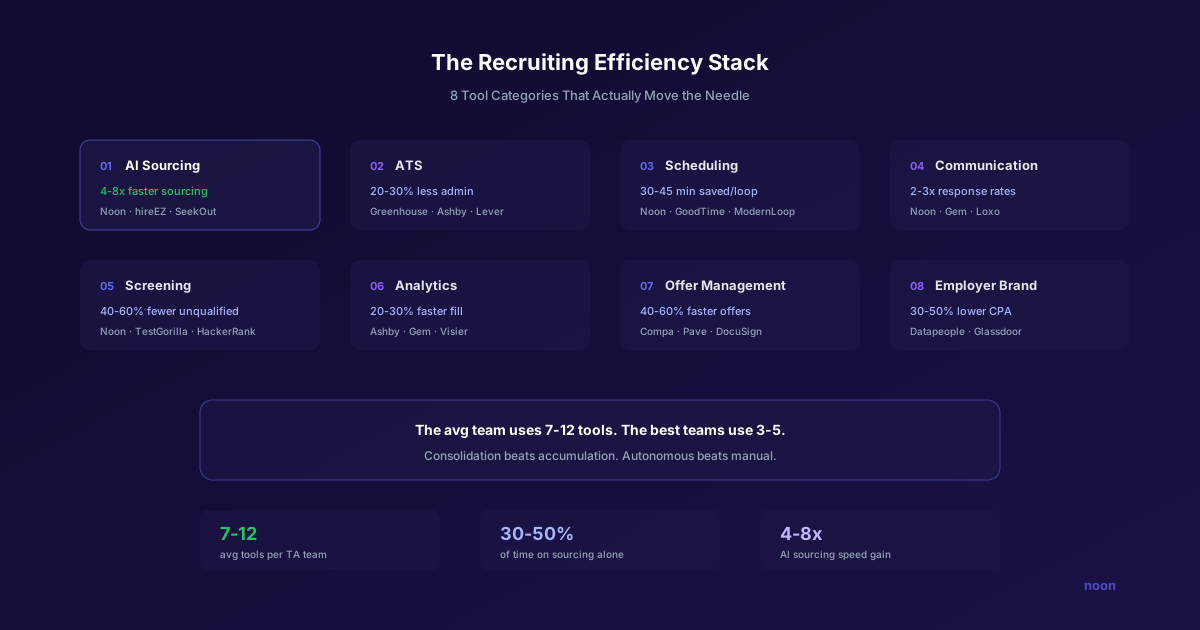
Key takeaway: The categories that actually change a recruiter's week are AI sourcing agents (Noon), recruiting CRMs (Gem), scheduling automation (GoodTime, Calendly), and pipeline analytics (Visier, Crosschq). Consolidate around three to five tools that address your single biggest bottleneck, and insist on measuring the gain yourself: any vendor percentage you cannot reproduce from your own before-and-after numbers should be treated as marketing, not a forecast.
Recruiting stacks grow one bottleneck at a time, because every bottleneck arrives with a vendor attached. That is not efficiency. It is context-switching overhead disguised as a tech stack.
The stack keeps growing for a defensible reason and stays inefficient for an avoidable one. Hiring is genuinely harder: ManpowerGroup's 2025 Talent Shortage survey (published 2025) found 74% of employers worldwide report difficulty filling roles with the skills they need. At the same time, the channels those tools depend on tightened: since 1 February 2024 every sender to personal Gmail accounts must authenticate with SPF or DKIM, and senders above 5,000 messages a day must publish SPF, DKIM, and DMARC and keep reported spam below 0.30% (Google Email sender guidelines, checked 17 August 2026). Buying a ninth tool does not help if the eighth one sends from an unauthenticated domain.
The irony is that most of these tools were purchased to save time. But each one comes with its own login, its own interface, its own notification system, and its own way of defining a "candidate." The result is a recruiting workflow that looks more like an obstacle course than a pipeline.
Real recruiting efficiency doesn't come from adding more tools. It comes from consolidating workflows, eliminating manual handoffs, and letting AI handle the tasks that don't require human judgment - so recruiters can focus on the tasks that do.
This article covers the tools that actually improve recruiting efficiency in 2026, organized by the workflow stage they optimize. For a broader overview of recruiting software categories and selection criteria, see our guide to recruiting tools, and for platform-by-platform rankings see our best AI recruiting software comparison. For each category below, we'll explain what good looks like, name the tools that deliver, and highlight where Noon fits into the picture.
| Workflow stage | Category | Leading tools |
|---|---|---|
| Find | AI sourcing | Noon, hireEZ, SeekOut |
| Track | ATS | Greenhouse, Ashby, Lever |
| Schedule | Interview scheduling | GoodTime, Calendly, ModernLoop |
| Engage | Outreach | Noon, Gem |
| Assess | Screening | HireVue, TestGorilla, Codility |
| Measure | Analytics | Ashby, Gem, Visier |
| Close | Offer management | Greenhouse, Compa, Pave |
| Attract | Employer branding | Datapeople, The Muse, Glassdoor |
What does recruiting efficiency actually mean?
Before listing tools, it's worth defining what we're optimizing for. Recruiting efficiency has three dimensions:
1. Time efficiency - How many hours does it take to move a candidate from sourcing to hire? The fewer manual steps, the better.
2. Quality efficiency - What percentage of sourced candidates make it to the interview stage? High-quality sourcing means less time wasted on unqualified candidates.
3. Cost efficiency - What's the fully loaded cost per hire, including tool subscriptions, recruiter time, and external agency fees?
The best recruiting tools improve all three simultaneously. A tool that saves time but degrades quality (e.g., a mass email blaster that generates lots of responses from poor-fit candidates) doesn't improve efficiency - it just moves the bottleneck from outreach to screening.
What are the 8 categories of recruiting efficiency tools?
1. AI sourcing and candidate discovery
The bottleneck: Sourcing is where recruiter hours disappear: building Boolean strings, scrolling profiles, evaluating fit, and compiling shortlists. The market makes it worse. ManpowerGroup's 2025 Talent Shortage survey found 74% of employers worldwide report difficulty filling roles with the skills they need, which means more searching per hire than in a loose market.
What good looks like: Describe the role in natural language, get a ranked shortlist of qualified candidates in minutes, with contact information and personalized outreach ready to send.
Top tools:
- Noon - Autonomous AI agent that handles sourcing end-to-end. Describe the role, review the shortlist, and Noon handles outreach. Because sourcing, personalization, and outreach are in one system, there's no manual handoff between "find candidates" and "reach out to them." This eliminates the most time-consuming step in the recruiting workflow.
- hireEZ - 800M+ profile database with AI-powered search and automated outreach sequences. Strong for high-volume sourcing across diverse data sources.
- SeekOut - Deep search across GitHub, patents, and research papers. Best for technical and specialized hiring where LinkedIn alone isn't enough.
- Gem - CRM-first platform with AI sourcing layered on top. Strong for teams already using Gem for pipeline management.
How to measure the gain: Time-box your current process for one role (hours from kickoff to a shortlist you would actually send a hiring manager), then repeat it with the tool. Also record how many sourced candidates reach a first interview, because a tool that halves sourcing hours while halving shortlist quality has moved the bottleneck rather than removed it.
2. Applicant tracking systems (ATS)
The bottleneck: Without a good ATS, candidate data lives in spreadsheets, email threads, and recruiter memory. Duplicate candidates, lost applications, and zero pipeline visibility are the symptoms.
What good looks like: Every candidate interaction is tracked, pipeline stages are visible at a glance, and the system integrates cleanly with your sourcing and communication tools.
Top tools:
- Greenhouse - The market leader for structured hiring. Scorecards, interview kits, and approval workflows built for process-driven teams. Integrates with most sourcing tools including Noon.
- Ashby - Modern ATS built for speed. Clean interface, native analytics, and a workflow engine that automates stage transitions. Growing fast among startups and mid-market teams.
- Lever - CRM + ATS hybrid that handles both relationship management and application tracking in one system. Good for teams that do a lot of proactive sourcing.
- Workday Recruiting - Enterprise-grade ATS integrated with Workday's HCM suite. Best for large organizations already on Workday.
How to measure the gain: Count the manual re-entry steps that disappear (candidate creation, stage updates, interview notes) and track how many roles sit untouched for more than seven days before and after. Stalled-role count is the metric an ATS should visibly improve.
3. Interview scheduling
The bottleneck: Scheduling is the most universally hated step in recruiting. Coordinators spend hours playing calendar Tetris between candidates, interviewers, and hiring managers. Every reschedule triggers a cascade of emails.
What good looks like: Candidates self-schedule from available time slots. Multi-panel interviews are auto-coordinated. Reschedules happen with one click.
Top tools:
- Noon - Integrated interview scheduling that works as part of the full pipeline. When a candidate responds positively to outreach, the system can automatically present available time slots based on interviewer calendars - no coordinator required.
- GoodTime - Purpose-built interview scheduling platform with interviewer load balancing, diversity panel requirements, and automated coordinator workflows.
- Calendly for Teams - Simple but effective for single-round scheduling. Less sophisticated for multi-panel coordination but very easy to set up.
- ModernLoop - Scheduling automation with analytics on interviewer utilization and candidate experience metrics.
How to measure the gain: Track elapsed hours from "ready to schedule" to a confirmed calendar hold, plus reschedule count per loop. Scheduling automation should compress the first metric and reduce the second, and both are easy to pull from calendar history.
4. Candidate communication and outreach
The bottleneck: Recruiters draft the same types of messages hundreds of times: outreach, follow-ups, interview confirmations, rejections, offer letters. Each one is slightly different, requiring mental context-switching.
What good looks like: AI-generated, context-aware messages for every communication touchpoint. Multi-channel delivery (email and SMS). Adaptive sequencing based on candidate engagement.
Top tools:
- Noon - Generates personalized outreach and manages multi-channel sequences automatically. Every message references the candidate's specific background and the role's requirements.
- Gem - Strong email sequencing with A/B testing, send-time optimization, and SOBO (send on behalf of) capabilities.
- Ashby - Built-in messaging with templates and sequence automation. Less sophisticated than dedicated outreach tools but well-integrated with the ATS.
- Loxo - All-in-one recruiting platform with CRM, sourcing, and outreach. The "do everything in one place" approach.
How to measure the gain: Record messages sent per recruiter-hour and reply rate on comparable roles, and check inbox placement before comparing copy. If authentication is broken, every copy test you run is measuring noise.
5. Candidate screening and assessment
The bottleneck: Reviewing resumes, conducting phone screens, and evaluating candidates against criteria is time-intensive and prone to bias. A typical phone screen takes 30 minutes, and many candidates don't make it past this stage.
What good looks like: AI-powered pre-screening that evaluates candidates against non-negotiable criteria before a human ever looks at the application. Structured assessments that predict on-the-job performance.
Top tools:
- Noon - Non-negotiable screening built into the sourcing process. Candidates are evaluated against hard requirements (visa status, years of experience, specific certifications) before they ever enter the pipeline.
- HireVue - Video interview platform with AI analysis of candidate responses. Controversial (bias concerns with facial analysis) but widely adopted for high-volume screening.
- TestGorilla - Pre-employment assessment platform with 300+ skills tests. Good for validating technical skills before the interview stage.
- Codility / HackerRank - Technical assessment platforms for engineering hiring. Candidates complete coding challenges that are auto-scored.
How to measure the gain: Track the pass-through rate from screen to hiring-manager interview, and the number of screens performed per hire. If screening automation is working, screens per hire falls while pass-through rate rises.
6. Pipeline analytics and reporting
The bottleneck: Most recruiting teams can't answer basic questions: What's our average time-to-fill? Where do candidates drop off? Which sourcing channels produce the best hires? Without data, optimization is guesswork.
What good looks like: Real-time dashboards showing pipeline health, conversion rates by stage, sourcing channel effectiveness, and cost-per-hire by role type.
Top tools:
- Ashby - Best-in-class native analytics among ATS platforms. Funnel analysis, source effectiveness, time-in-stage, and custom reports without needing a BI tool.
- Gem - Pipeline analytics focused on outreach effectiveness: open rates, response rates, conversion by sequence and channel.
- Visier - Enterprise workforce analytics platform that connects recruiting data to broader HR metrics (retention, performance, compensation).
- Datapeople - Job posting analytics that predict which postings will attract diverse and qualified applicant pools.
How to measure the gain: Analytics does not make hiring faster on its own. The test is whether it changes a decision: if a dashboard has not caused you to move a stage, replace a channel, or reassign a requisition within its first quarter, it is reporting rather than analysis.
7. Offer management and closing
The bottleneck: The offer stage is where many hiring processes stall. Approval chains, compensation benchmarks, equity calculations, and document generation all introduce delays.
What good looks like: Automated offer letter generation with pre-approved compensation bands. Digital signature collection. Real-time approval workflows.
Top tools:
- Greenhouse - Offer approval workflows and letter generation integrated with the ATS.
- Compa - Real-time compensation benchmarking to ensure offers are competitive.
- DocuSign - Digital signature for offer letter acceptance. Industry standard.
- Pave - Total compensation data and offer modeling. Helps hiring managers understand how their offers compare to market.
How to measure the gain: Measure elapsed days from final interview to signed offer, and offer-acceptance rate. Both are sensitive to approval-chain delays, which is exactly what offer tooling removes.
8. Employer branding and job marketing
The bottleneck: Great candidates don't apply if they don't know you exist. Employer brand is the passive pipeline that feeds your active sourcing efforts.
What good looks like: Consistent employer brand across job postings, career pages, social media, and review sites. Content that attracts candidates before they're actively looking.
Top tools:
- Datapeople - Optimizes job descriptions for inclusivity and clarity. Predicts application rates based on language analysis.
- The Muse - Employer branding content platform with company profiles, employee stories, and targeted job advertising.
- Glassdoor - Employer review management. Responding to reviews and maintaining a strong profile is table-stakes for employer brand.
How to measure the gain: Track qualified applications per role and cost per qualified application, not raw application volume. Branding work that raises applications while lowering qualification rate has made the screening problem larger.
Why should you consolidate your recruiting stack?
The biggest efficiency gain in recruiting isn't any single tool - it's reducing the number of tools.
Every context switch between systems costs time and cognitive load. Every manual data transfer between tools introduces errors and delays. Every additional vendor means another contract, another integration to maintain, another support channel.
The most efficient recruiting teams in 2026 are moving toward consolidated platforms that handle multiple workflow stages in a single system. Noon exemplifies this approach: sourcing, screening, outreach, and scheduling in one autonomous workflow. Instead of managing a sourcing tool, an outreach tool, and a scheduling tool separately, the recruiter interacts with one system that handles the full pipeline. Teams evaluating this approach can book a demo to see how an integrated AI agent compares to their current multi-tool sourcing workflow.
This doesn't mean one tool for everything. The ATS is a separate concern (it's your system of record for compliance and process management), and specialized tools for assessment, analytics, and employer branding have their place. But the core sourcing-to-engagement workflow benefits enormously from consolidation.
How do you audit your recruiting stack for efficiency?
A simple framework for evaluating whether your current tools are actually making you more efficient:
Step 1: Map the workflow. List every step from job requisition to offer acceptance. Note which tool is used at each step and how data moves between them.
Step 2: Identify handoff points. Where does a recruiter manually move data from one system to another? Each handoff is a potential efficiency gap.
Step 3: Measure time-in-stage. How long does each step actually take? Compare against benchmarks (SHRM publishes annual recruiting metrics).
Step 4: Calculate cost-per-tool-per-hire. Divide each tool's annual cost by the number of hires it contributes to. Some tools will look expensive relative to their impact.
Step 5: Test consolidation. Run a pilot where one recruiter uses a consolidated platform (like Noon for sourcing + outreach + scheduling) instead of the current multi-tool workflow. Compare time-to-fill and recruiter satisfaction.
FAQ
How many recruiting tools should a team use? There's no universal number, but the most efficient teams use 3-5 core tools: an ATS (system of record), a sourcing/outreach platform (Noon or equivalent), a scheduling solution (often integrated with the sourcing platform), and analytics (often native to the ATS). Anything beyond that should be justified by clear, measurable efficiency gains.
What's the biggest time waster in recruiting? Sourcing and outreach are where most teams find their largest measured gain when they instrument the work, which is unsurprising given that 74% of employers report difficulty filling roles (ManpowerGroup, 2025) and every unfilled role means more searching per hire. Measure it before you assume it: log recruiter hours by activity for two weeks, then automate the largest bucket. Two constraints cap that gain, and both are worth checking before you attribute a slow week to the tool: LinkedIn's per-seat InMail credits and invitation restrictions (LinkedIn limits for recruiters), and inbox placement, since Gmail, Yahoo, and Outlook now reject unauthenticated bulk mail rather than filtering it (recruiting email deliverability).
Are all-in-one recruiting platforms worth it? It depends on the platform. An all-in-one that does everything adequately but nothing excellently can be worse than a best-of-breed stack with strong integrations. The exception is when the all-in-one genuinely automates (not just consolidates) - platforms like Noon that autonomously handle entire workflow stages are different from platforms that just put multiple manual tools behind one login.
How do I get budget for new recruiting tools? Build the business case around cost-per-hire and time-to-fill. If a $200/month tool saves 10 hours of recruiter time per month (at ~$40/hour loaded cost), that's a $400/month savings - 2x ROI. Most recruiting tools pay for themselves within 1-2 months when properly utilized.




