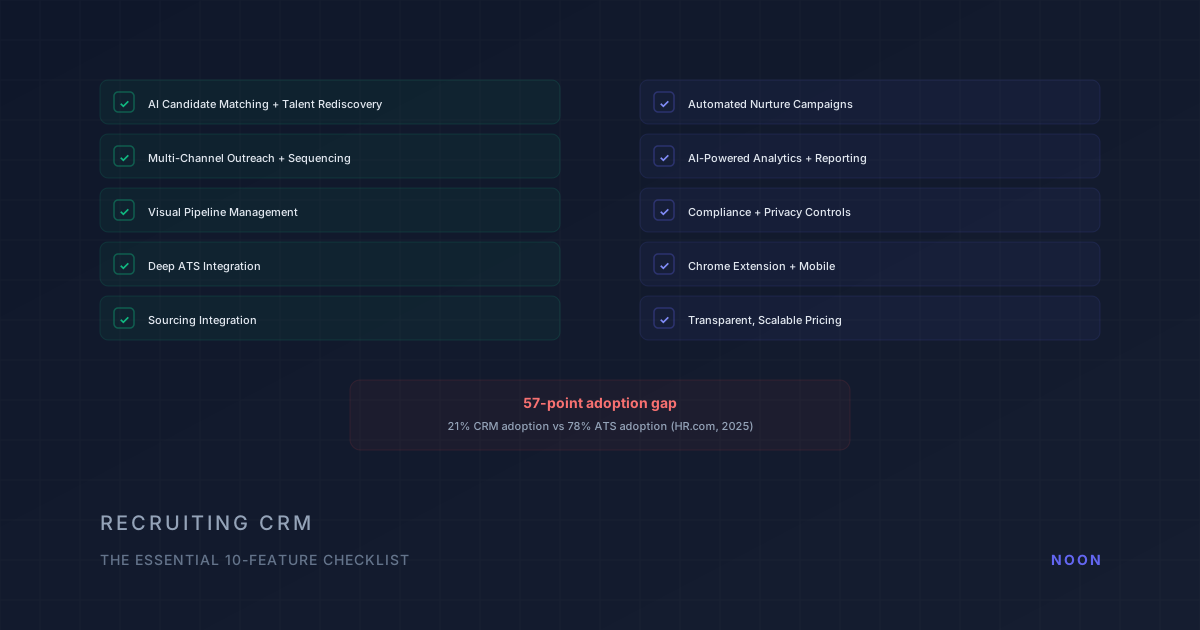
Key takeaway: The 10 essential recruiting CRM features are: unified candidate profiles, automated nurture sequences, pipeline analytics, talent pool segmentation, source tracking, team collaboration, AI-powered matching, integration with your ATS, mobile access, and compliance management. Only 21% of organizations use a dedicated CRM despite 78% running an ATS. The gap represents a major competitive advantage for teams that close it.
Here's a number that should get every recruiting leader's attention: only 21% of organizations have adopted a recruiting CRM, compared with 78% running an applicant tracking system (HR.com, Future of Recruitment Technologies 2025-26). That's a 57-point adoption gap, and it's the biggest hidden source of pipeline leakage in recruiting today. For a broader look at how CRMs fit into your overall recruiting technology stack, see our guide to recruiting tools.
An ATS tracks applicants who raised their hand. A recruiting CRM manages relationships with everyone else: the passive candidates you sourced but who weren't ready, the silver medalists from past searches, the referrals you haven't activated yet. Without a CRM, these relationships evaporate. Every new req starts from zero. And 44% of sourced hires come from candidates already in the database (Gem Recruiting Benchmarks, 2025), which means teams without a CRM are ignoring nearly half their best hiring opportunities.
This checklist covers the 10 features that matter most when evaluating a recruiting CRM in 2026. Not every CRM needs all 10, but the ones that do are the ones that actually reduce time-to-fill.
1. AI-powered candidate matching and talent rediscovery
Why it matters: The most valuable function of a CRM is answering the question: "Who do we already know who fits this role?" Manually searching through thousands of past candidates is impractical. AI matching scans your existing database and surfaces candidates who fit new roles, even candidates who were sourced for different positions months or years ago.
What to look for:
- Skills-based matching that goes beyond job titles (a "data scientist" from 2023 might fit a "machine learning engineer" role today)
- Matching that considers career trajectory, not just current role
- Results ranked by relevance and recency of engagement
- Integration with your sourcing history so the system knows who you've already talked to and what happened
Red flag: CRMs that offer "AI matching" but only do keyword search on resumes. True matching understands context, for example that Kubernetes experience is relevant to a cloud infrastructure role even if "cloud infrastructure" doesn't appear on the resume.
2. Multi-channel outreach and sequencing
Why it matters: A CRM without outreach is just a database. The ability to reach candidates through coordinated email and SMS sequences, directly from the CRM, eliminates the need for a separate outreach tool.
What to look for:
- Multi-step sequences across email and SMS
- Personalization tokens that pull from candidate profiles (name, company, role, skills)
- AI-generated personalization for scale (not just template fill)
- A/B testing for subject lines, messaging, and timing
- Reply detection that automatically stops the sequence when a candidate responds
Red flag: CRMs that only support email. Single-channel outreach in 2026 leaves most passive candidates unreached.
3. Visual pipeline management
Why it matters: Recruiters need to see their pipeline at a glance: how many candidates are at each stage, where bottlenecks exist, which roles are moving and which are stalled.
What to look for:
- Kanban-style pipeline view with drag-and-drop stage management
- Multiple pipeline views (by role, by recruiter, by source, by stage)
- Customizable stages that match your actual hiring process
- Quick actions from the pipeline view (send message, add note, schedule interview)
4. Deep ATS integration
Why it matters: The CRM and ATS must work as a single system. Candidates should flow seamlessly from the CRM (pre-application relationship management) to the ATS (active applicant tracking) without manual data entry or duplicate records.
What to look for:
- Bi-directional real-time sync with your ATS (Greenhouse, Lever, Workday, etc.)
- Automatic deduplication across CRM and ATS
- Stage and status sync (rejection in ATS reflects in CRM)
- Unified candidate view: one profile that shows both CRM relationship history and ATS application history
- Source attribution that persists through the full hiring funnel
5. Sourcing integration
Why it matters: A CRM that doesn't source is only half a solution. You need to both discover new candidates and manage relationships with existing ones. The best CRMs either have built-in sourcing or integrate deeply with sourcing tools.
What to look for:
- Built-in search across LinkedIn, GitHub, and other professional platforms
- Contact information enrichment (verified emails, phone numbers)
- Profile enrichment that pulls latest career data automatically
- Integration with dedicated AI sourcing tools for autonomous discovery
Where Noon fits: Teams that use Noon for autonomous AI sourcing benefit from CRM integration because sourced candidates automatically enter the CRM with full profile data, outreach history, and screening evaluations. The CRM becomes the relationship management layer for candidates that Noon discovers. If you're evaluating whether a unified platform can handle both sourcing and relationship management in one system, you can book a demo to see how Noon's autonomous sourcing works alongside CRM capabilities.
6. Automated nurture campaigns
Why it matters: Candidates who aren't ready today might be ready in six months. Automated nurture keeps your brand in front of them without requiring recruiter time for each touchpoint.
What to look for:
- Drip campaigns triggered by candidate attributes or behavior
- Content sharing capabilities (blog posts, company updates, job alerts)
- Engagement tracking (opens, clicks, replies)
- Smart suppression (automatically stop nurturing when a candidate applies or is engaged in an active process)
- Re-engagement triggers based on career change signals
7. AI-powered analytics and reporting
Why it matters: Without analytics, you're guessing which sources produce quality hires, which outreach approaches work, and where your pipeline leaks. AI-powered analytics surface insights that manual reporting misses.
What to look for:
- Source-of-hire attribution across CRM and ATS
- Outreach performance metrics (response rates by channel, template, recruiter)
- Pipeline conversion rates by stage
- Time-in-stage analysis to identify bottlenecks
- Predictive analytics (which candidates are most likely to convert?)
- DEI pipeline analytics
8. Compliance and privacy controls
Why it matters: GDPR, CCPA, the EU AI Act, and NYC Local Law 144 all impose requirements on how candidate data is collected, stored, and used. Your CRM must handle compliance natively, not as an afterthought.
What to look for:
- Consent management (track how and when candidates consented to contact)
- Data retention policies with automatic purging
- Candidate self-service for data access and deletion requests
- Bias audit capabilities for AI-powered features
- Regional data residency options
- Audit trail for all candidate interactions
9. Chrome extension and mobile access
Why it matters: Recruiters work across platforms: LinkedIn, email, calendars, job boards. A Chrome extension that overlays CRM data on these platforms saves constant tab-switching. Mobile access ensures recruiters can manage relationships on the go.
What to look for:
- Chrome extension that shows CRM data and enables actions from LinkedIn, Gmail, and other frequently used tools
- Mobile app with full pipeline management, candidate communication, and note-taking
- Offline access for key data
10. Transparent, scalable pricing
Why it matters: CRM pricing varies wildly, from $15/user/month for basic tools to custom enterprise pricing of $50K+ per year for enterprise platforms. The pricing model should scale with your team size without surprise overages. Watch for the newest pattern: vendors moving the AI features out of the published seat price into a separately quoted "AI plan".
What to look for:
- Per-user or per-seat pricing that's predictable
- Free tier or trial to evaluate before committing
- No hidden fees for integrations, data exports, or customer support
- Clear upgrade path as your team and needs grow
What do recruiting CRMs cost in 2026?
Published seat prices, read from each vendor's pricing page in our individual pricing guides (dates in the linked articles, most recently re-read August to September 2026):
| CRM | Published entry price | What the entry price includes | Where the AI sits |
|---|---|---|---|
| Manatal | $15/user/month (Professional); $35 Enterprise | ATS + CRM with AI candidate scoring | Included |
| Bullhorn | $99/user/month (Starter); $165 Core | ATS + CRM for small agencies | Amplify AI on Pro and Max only |
| Recruiterflow | $119/user/month annual; $149 monthly | ATS, CRM, sequences, automation | AIRA agents in a separate custom-priced plan |
| Gem | $130/month for 1-10 employee companies (billed yearly) | AI sourcing, CRM, analytics, scheduling, ATS | Included at the small-company tier; larger teams quote-based |
| Loxo | $149/user/month (Core); $199 Professional | ATS + CRM of record; Professional adds Loxo Source | Agentic AI credits on Professional |
Two things stand out. First, the spread between the cheapest and most expensive published seat is more than 10x, and that spread does not track feature count: Manatal at $15 includes AI scoring while Bullhorn at $99 does not include Amplify. Second, three of the five vendors now keep their AI layer off the published price, either as a higher tier (Bullhorn, Loxo) or a separate plan (Recruiterflow). When you build the budget, ask for the all-in seat price with the AI features you actually intend to use, not the price on the pricing page.
Compare that with a platform that is not sold by the seat. Noon's AI Sourcer and AI Outreach run on one plan with unlimited sourcing, contacts, agents, and seats, and 20+ ATS integrations keep the ATS as the system of record; Noon does not publish a dollar price, so the comparison is on packaging rather than sticker.
How do you decide between a CRM and an ATS?
Many teams wonder whether they need a separate CRM or whether their ATS is sufficient. Here's the decision framework:
| Your situation | What you need |
|---|---|
| You only hire from inbound applicants | ATS is sufficient |
| You actively source passive candidates | CRM + ATS |
| You hire for recurring roles and want to maintain candidate relationships | CRM + ATS |
| You want to reduce agency dependency over time | CRM + ATS |
| You have a small team with occasional hiring | ATS may be sufficient |
| You're scaling hiring and building a talent pipeline strategy | CRM + ATS (or an all-in-one like Noon) |
The trend is clear: teams that treat recruiting as relationship management, not just application processing, consistently achieve faster fills, lower costs, and higher quality hires. A CRM is the system that makes relationship management scalable.
Frequently asked questions
What's the difference between a recruiting CRM and an ATS? An ATS manages active applicants through the hiring process (application → screening → interview → offer). A CRM manages relationships with all candidates, including passive prospects, silver medalists, and future fits, across time and roles. Most teams need both.
Do I need a CRM if I already use LinkedIn Recruiter? LinkedIn Recruiter helps you find and contact candidates on LinkedIn. A CRM manages relationships across all sources and channels over time. If you source from multiple platforms, nurture candidates between roles, or want to track long-term relationship history, a CRM adds significant value beyond LinkedIn.
How much does a recruiting CRM cost? Ranges from $15/user/month (Manatal) to custom enterprise pricing ($50K+/year for platforms like Beamery or Phenom). Mid-market options typically run $50-150/user/month. Evaluate ROI based on time saved, agency spend reduced, and pipeline quality improved.
Does a CRM duplicate what my ATS already does? Partly, and the overlap is the most common objection prospects raise when they evaluate a new recruiting tool alongside an existing ATS. Both hold candidate records. The difference is scope: an ATS record exists because someone applied to a specific job, a CRM record exists because you want a relationship regardless of job. If your ATS already offers talent pools, nurture campaigns, and re-engagement, you may only need to switch those features on. If it does not, a CRM adds the layer, and the integration (feature 4 above) is what stops the two systems drifting apart.
Which CRM features actually change time-to-fill? The ones that shorten the gap between opening a req and having a warm shortlist: talent rediscovery (feature 1), because searching the existing database is faster than sourcing cold, and multi-channel sequencing (feature 2), because reply rates decide how fast the shortlist fills. Our candidate reply rate benchmarks show how much channel and follow-up cadence move that number. Reporting features help you prove the improvement; they do not create it.
Can AI sourcing tools replace a CRM? Not entirely, but the lines are blurring. AI sourcing platforms like Noon that handle sourcing, outreach, and candidate management in one system reduce the need for a separate CRM. If your AI sourcing tool maintains relationship history, supports nurture sequences, and integrates with your ATS, it may cover the CRM use case.




