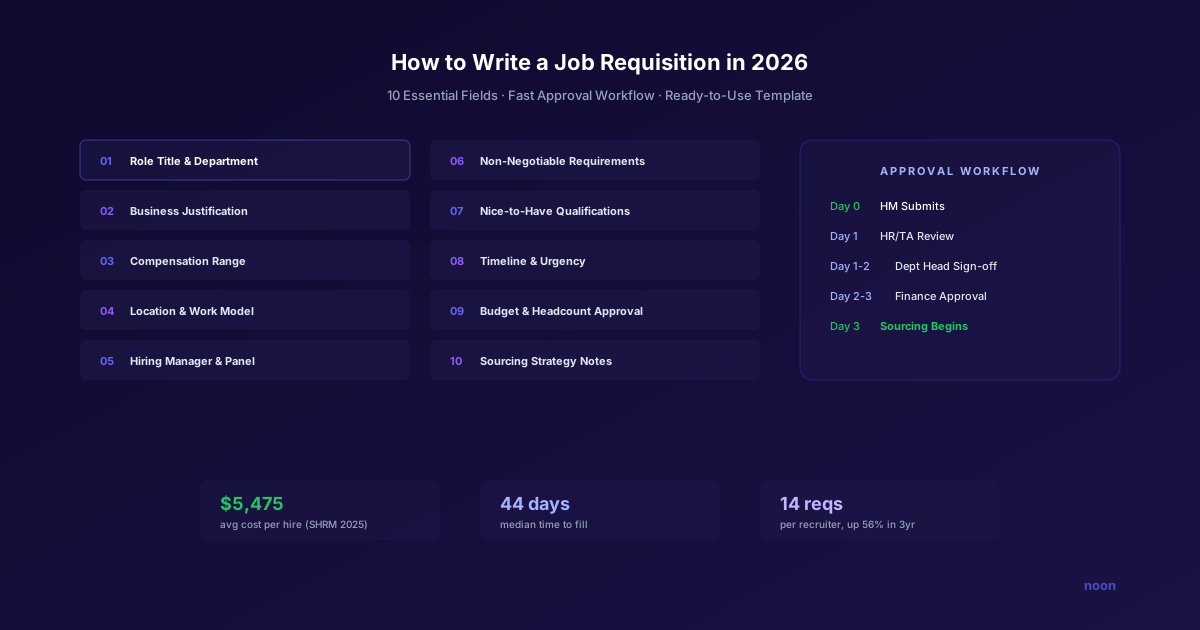
Key takeaway: A strong job requisition includes 10 essential fields: role title/department, business justification, compensation range, location/work model, hiring manager/panel, must-have requirements, nice-to-have qualifications, timeline, budget/headcount approval, and sourcing strategy notes. Clear requisitions align hiring managers and recruiters from day one. The biggest mistake is listing too many non-negotiables when 3-5 true must-haves is enough to predict success in the role.
A job requisition isn't glamorous, but it's the document that controls whether recruiting starts or stalls.
It's the formal internal authorization to open a position — the contract between the hiring manager, HR, finance, and leadership that says "yes, we need this role, we've budgeted for it, and here's exactly what we're looking for." Until it clears sign-off, no sourcing, no job posting, no candidate outreach. The requisition is one of the foundational hiring processes covered in our hiring best practices guide, but it's often the most overlooked.
According to SHRM's 2025 Recruiting Benchmarking Report, the average cost per hire reached $5,475 for nonexecutive roles and $35,879 for executive roles, with a median time to fill of 44 days. Every dollar and day of that process traces back to what was written in the requisition. Get it right, and the hire moves. Get it wrong, and it stalls in budget review — or worse, you source candidates against the wrong criteria and waste weeks of recruiter time.
This guide covers how to write a job requisition that clears approvals quickly, gives recruiters the information they need to source effectively, and sets the hiring process up for success from day one.
What a job requisition is (and isn't)
A job requisition is not a job description and it's not a job posting. These are three different documents with different audiences and purposes:
| Document | Audience | Purpose |
|---|---|---|
| Job requisition | Internal (HR, finance, leadership) | Authorize opening the position |
| Job description | Candidates | Attract qualified applicants |
| Job posting | Job boards, career page | Distribute the role publicly |
The requisition is the upstream document. The job description and posting are derived from it. If the requisition is vague ("We need a senior engineer"), the job description will be vague, the posting will attract the wrong candidates, and the recruiter will waste time sourcing against poorly defined criteria.
The 10 essential fields
Every requisition should include these fields. Skip one and you'll create a bottleneck somewhere downstream.
1. Role title and department
Use the standardized title from your job architecture, not the hiring manager's preferred nickname. "Senior Software Engineer — Backend, Platform Team" is actionable. "Rockstar Developer" is not.
If your company doesn't have a job architecture, this is a sign you need one. Standardized titles ensure consistent compensation bands, career ladders, and reporting.
2. Business justification
Why does this role need to exist? There are four standard justifications:
- Backfill: Someone left or is leaving. Include the departure date and whether the role scope has changed.
- Growth: Business demand requires additional headcount. Include the specific metric driving growth (revenue targets, customer volume, product roadmap).
- New role: A function or team is being created. Include the strategic rationale and expected team structure.
- Contractor conversion: A contractor in the role needs to be converted to full-time. Include the contractor's performance history and the reason for conversion.
Finance cares about business justification more than anything else on the requisition. Make it data-driven: "The support team is handling 40% more tickets than last quarter with the same headcount — CSAT has dropped from 4.2 to 3.7" is more compelling than "we need more help."
3. Compensation range
Include the target range, not a single number. The range should be based on your compensation philosophy and current market data.
Include:
- Base salary range (e.g., $150,000-$180,000)
- Equity/RSU range if applicable (e.g., $30,000-$50,000 annual vest)
- Bonus eligibility (e.g., 10-15% target)
- Any sign-on bonus pre-approval
Common mistake: Leaving compensation TBD until the offer stage. This delays hiring manager alignment, surprises finance during the offer, and risks losing candidates when the offer doesn't match their expectations.
4. Location and work model
Specify exactly:
- Location: On-site (which office?), remote (which timezones?), or hybrid (how many days?)
- Relocation: Is relocation assistance available? What's the budget?
- Visa sponsorship: Will you sponsor? H-1B, E-3, TN, etc.?
This field has become more important since 2020 as work models have diversified. A vague "flexible" location creates ambiguity that slows sourcing and frustrates candidates.
5. Hiring manager and interview panel
- Hiring manager: Who makes the final decision?
- Interview panel: Who will interview candidates, in what order, and assessing what competencies?
- Recruiter assigned: Who owns the search?
Defining the panel upfront prevents the scheduling nightmare of assembling interviewers ad hoc after candidates are already in the pipeline.
6. Must-have requirements (non-negotiables)
The criteria that every candidate must meet — no exceptions. These are the hard filters that determine who enters the pipeline and who doesn't.
Keep this list short (3-5 items max). Every non-negotiable you add reduces your candidate pool. Common non-negotiables:
- Minimum years of relevant experience
- Specific technical skills or certifications
- Work authorization status
- Location requirements
If you're using an AI sourcing platform like Noon, non-negotiables are especially important. They're the criteria the AI uses to filter candidates before presenting a shortlist. Vague non-negotiables produce vague shortlists.
7. Nice-to-have qualifications
The criteria that improve a candidate's fit but aren't required. These are the differentiators among candidates who meet all non-negotiables.
- Industry experience (e.g., "fintech experience preferred")
- Specific technologies beyond the minimum
- Leadership or mentorship experience
- Advanced degrees or certifications
8. Timeline
- Target start date: When does the hiring manager need this person?
- Urgency level: Standard, priority, or urgent?
- Approval deadline: When does the req need to be signed off to meet the start date?
Work backward from the target start date: if you need someone starting August 1, and your average time-to-fill is 44 days, the requisition should be approved by mid-June at the latest. Add 2-4 weeks for offer negotiation and notice period.
9. Budget and headcount approval
- Budget source: Which cost center or team budget funds this role?
- Headcount plan alignment: Is this role already in the approved headcount plan, or is it an incremental request?
- Approval chain: Who needs to sign off? (Manager → Director → VP → Finance → HR)
10. Sourcing strategy notes
This field is often missing but incredibly useful for the recruiter:
- Where to focus: "Look for candidates from fintech companies with high-volume transaction experience"
- Where not to look: "We've already exhausted the local market — need remote candidates"
- Competitor targets: "Engineers from [specific companies] would be a strong fit"
- Previous pipeline: "We had strong finalists from last quarter's search who might still be interested"
When a recruiter opens an AI sourcing tool like Noon to start sourcing, this context shapes the natural language description they provide — and better context produces better candidates. If your team is evaluating AI sourcing for requisition fulfillment, you can book a demo to see how requisition data translates into qualified shortlists.
What should the requisition approval workflow look like?
A well-designed approval workflow clears in 2-3 business days. A poorly designed one takes 2-3 weeks.
Recommended workflow:
Step 1: Hiring manager submits requisition (Day 0). All 10 fields completed. Submission triggers automated routing.
Step 2: HR/TA review (Day 1). Recruiter or TA ops reviews for completeness, ensures compensation aligns with bands, and flags any issues.
Step 3: Department head approval (Day 1-2). VP or director confirms business need and priority.
Step 4: Finance approval (Day 2-3). FP&A confirms budget availability and headcount plan alignment.
Step 5: Requisition activated in ATS (Day 3). Recruiter begins sourcing. If using Noon, the AI can start generating shortlists within hours of requisition activation.
Speed tips:
- Pre-approve compensation bands by level annually so individual reqs don't require case-by-case finance review
- Use electronic routing (not email chains) for approvals
- Set SLAs for each approval step (24 hours each)
- Auto-escalate approvals that miss SLAs
What are the most common job requisition mistakes?
Mistake 1: Copy-pasting from the last similar hire. Every role is different, even if the title is the same. The business justification, team context, and non-negotiables may have changed. Review and update every field.
Mistake 2: Too many non-negotiables. Each non-negotiable shrinks your candidate pool. If you have 8 non-negotiables, your recruiter's sourcing pool may be too small to produce a competitive shortlist. Stick to 3-5 true must-haves.
Mistake 3: Vague compensation. "Competitive" is not a compensation range. Recruiters need a number to screen candidates and set expectations. Finance needs a number to track budget.
Mistake 4: Skipping sourcing strategy notes. Without context, the recruiter starts from zero. Five minutes of sourcing guidance from the hiring manager saves days of unfocused searching.
Mistake 5: No timeline pressure. Requisitions without target dates get deprioritized. Even if the date is approximate, having one creates accountability.
Job requisition template
Here's a ready-to-use template:
Role Title: [Standardized title, e.g., "Senior Software Engineer — Backend"] Department/Team: [e.g., "Platform Engineering"] Hiring Manager: [Name] Requisition Type: [ ] Backfill [ ] Growth [ ] New Role [ ] Conversion
Business Justification: [2-3 sentences explaining why this role is needed, with data if possible]
Compensation:
- Base Salary Range: $_____ - $_____
- Equity/RSU Range: $_____ - $_____ (annual vest)
- Bonus Target: _____%
- Sign-on Pre-approved: [ ] Yes [ ] No Amount: $_____
Location: [ ] On-site (Office: ___) [ ] Remote (Timezones: __) [ ] Hybrid (Days: ) Relocation Available: [ ] Yes (Budget: $) [ ] No Visa Sponsorship: [ ] Yes (Types: ___) [ ] No
Non-Negotiable Requirements:
Nice-to-Have Qualifications:
Interview Panel:
| Round | Interviewer | Focus Area |
|---|---|---|
| Phone Screen | [Recruiter] | Qualifications, motivation, logistics |
| Round 1 | [Name] | [Technical/behavioral focus] |
| Round 2 | [Name] | [Technical/behavioral focus] |
| Final | [Hiring Manager] | [Fit, team dynamics, closing] |
Timeline:
- Target Start Date: ___
- Urgency: [ ] Standard [ ] Priority [ ] Urgent
- Approval Needed By: ___
Sourcing Strategy Notes: [Guidance for recruiter: where to focus, companies to target, previous pipeline]
Approvals:
- Hiring Manager: ___ (Date: ___)
- Department Head: ___ (Date: ___)
- Finance/FP&A: ___ (Date: ___)
- HR/TA Ops: ___ (Date: ___)
FAQ
What's the difference between a job requisition and a job description? A job requisition is an internal authorization document — it's the business case and approval to open a role. A job description is a candidate-facing document that describes the role's responsibilities and qualifications. The requisition comes first; the JD is derived from it.
Who should write the job requisition? The hiring manager writes the first draft (they understand the business need and role requirements best). The recruiter or HR partner reviews for completeness and consistency with compensation bands and job architecture.
How long should the approval process take? 2-3 business days maximum. If approvals routinely take longer, audit the workflow for bottlenecks. Common issues: too many approvers, unclear routing, approvers not checking their queue.
Should I use AI to help write requisitions? For the candidate-facing job description, yes — AI tools like Datapeople and Textio can optimize for inclusivity and clarity. For the requisition itself, the business justification and non-negotiables should come from the hiring manager's direct knowledge.




