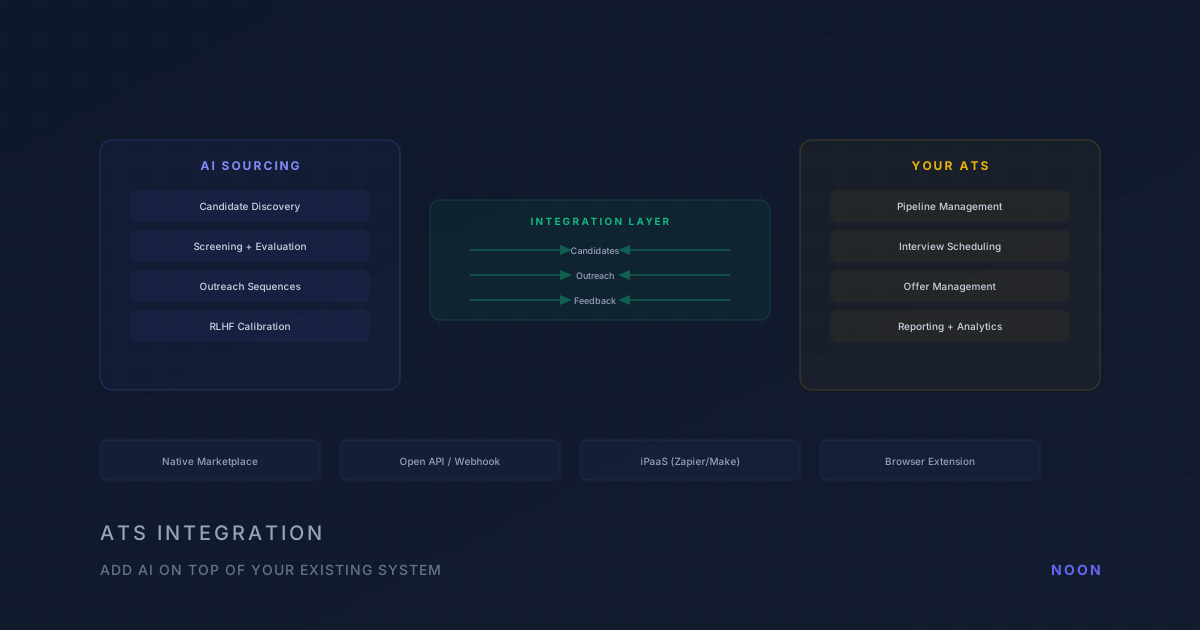
Key takeaway: You don't need to replace your ATS to get AI sourcing — the four integration patterns are native marketplace integration, open API/webhook integration, iPaaS automation (Zapier, Make, Workato), and browser extension overlay. Native marketplace integrations (direct ATS ↔ AI tool connection) deliver the best results with real-time candidate sync, automated status updates, and duplicate prevention. Most modern AI sourcing tools integrate with Greenhouse, Lever, Ashby, and Workday out of the box.
Less than half of companies are satisfied with their ATS, and 1 in 4 plan to replace it within 12 months (Aptitude Research, 2025). But replacing an ATS is a 12-to-24-month project — migrations, data transfers, workflow rebuilds, team retraining. Adding an AI sourcing layer on top of your existing ATS is typically a 1-to-8-week project.
That's the practical reality driving most teams' approach: keep the ATS as the system of record, bolt on AI for top-of-funnel sourcing and screening, and make sure the integration is tight enough that recruiters work from a single pipeline view. For broader context on how AI sourcing fits into your overall talent acquisition strategy, see our complete guide to AI recruiting.
This guide covers the four integration patterns, how to evaluate which one fits, and the specific pitfalls that cause integration rollouts to fail.
Why does ATS integration matter more than the sourcing tool itself?
A brilliant AI sourcing tool that doesn't sync to your ATS creates a parallel pipeline. Recruiters toggle between two systems. Candidate data lives in two places with different update cadences. Source-of-hire metrics break because some candidates entered through the ATS and others through the AI tool. Notes and outreach history are fragmented.
This isn't a theoretical problem. It's the number-one reason AI recruiting tool deployments fail in practice. The tool works — the integration doesn't. And when the integration doesn't work, recruiters stop using the tool because the overhead of maintaining two systems outweighs the sourcing benefit.
A clean integration gives you three things:
- One pipeline view. Every candidate appears in the ATS regardless of which tool found them. Recruiters work from a single source of truth.
- No duplicate work. Notes, stage transitions, outreach history, and candidate evaluations sync automatically — not manually re-entered.
- Real reporting. Time-to-fill, source-of-hire, and pipeline conversion metrics are accurate because every candidate flows through the ATS.
What are the four AI sourcing + ATS integration patterns?
Almost every AI sourcing tool connects to your ATS through one of four patterns. Understanding these helps you evaluate tools and predict implementation effort.
Pattern 1: Native marketplace integration
How it works: The AI tool has a pre-built integration with your ATS, available through the ATS marketplace (e.g., Greenhouse Partner Marketplace, Lever Integration Catalog). Setup involves clicking "Install" and authorizing the connection.
Setup effort: Low — under an hour in most cases.
Data flow: Typically one-directional (AI tool → ATS) or limited bi-directional. Candidates discovered by the AI tool are pushed to the ATS with basic profile data, stage, and source attribution.
Limitations: You get whatever the vendor built — which may not include custom fields, specific stage mappings, or advanced workflows. Sync frequency varies (some are real-time, others batch every 15-60 minutes).
Best for: Teams on mainstream ATS platforms (Greenhouse, Lever, Ashby) that need a quick, no-code setup.
Pattern 2: Open API / webhook integration
How it works: The AI tool exposes APIs and supports webhooks that your team connects to the ATS APIs. This requires some engineering work but gives you full control over what data flows where and how.
Setup effort: Medium to high — typically 1-4 weeks of engineering time depending on complexity.
Data flow: Fully customizable bi-directional. You control which fields sync, how stages map, when webhooks fire, and how conflicts resolve.
Limitations: Requires engineering resources. Needs maintenance when either the AI tool or ATS updates their API.
Best for: Teams with engineering resources that need custom workflows, complex field mappings, or integration with less common ATS platforms. Also appropriate for Workday, SAP SuccessFactors, and other enterprise HRIS systems that don't have marketplace integrations with newer AI tools.
Pattern 3: iPaaS automation (Zapier, Make, Workato)
How it works: A middleware platform like Zapier or Workato connects the AI tool and ATS without custom code. You build "zaps" or "workflows" that trigger actions: when a candidate is sourced in the AI tool, create a candidate record in the ATS.
Setup effort: Low to medium — a few hours for basic workflows, a few days for complex ones.
Data flow: Depends on the triggers and actions available. Most iPaaS platforms support basic candidate creation and stage updates. More complex workflows (syncing notes, feedback, custom fields) may be limited.
Limitations: Can be brittle at scale. Rate limits on free/low-tier plans cause sync failures during high-volume sourcing. Error handling is often limited — if a sync fails, the candidate may not appear in the ATS without anyone noticing.
Best for: SMB teams with light candidate volume that need a quick connection without engineering resources.
Pattern 4: Browser extension overlay
How it works: The AI tool operates as a browser extension that overlays on top of your ATS interface. It enriches candidate profiles, adds sourcing data, and triggers outreach from within the ATS — without a traditional backend integration.
Setup effort: Very low — install the extension, authorize, start using.
Data flow: Limited. The overlay shows data from the AI tool within the ATS interface, but may not write back to the ATS database. Think of it as a "heads-up display" rather than a true integration.
Limitations: Data may not persist in the ATS. Other team members who don't have the extension don't see the enriched data. Reporting doesn't capture the AI tool's contribution.
Best for: Individual recruiters or small teams that want to augment their ATS workflow without organizational buy-in for a full integration.
How do you choose the right integration pattern?
| Your situation | Recommended pattern |
|---|---|
| Mainstream ATS (Greenhouse, Lever, Ashby) + quick rollout | Native marketplace |
| Enterprise ATS (Workday, SAP) + engineering resources | Open API / webhook |
| SMB team, light volume, no engineering | iPaaS (Zapier/Make) |
| Individual recruiter, testing a tool | Browser extension |
| Custom ATS or complex workflow requirements | Open API / webhook |
What should be on your AI sourcing integration checklist?
Before committing to an AI sourcing tool, evaluate the integration across these dimensions:
Data sync
- Candidate profiles push to ATS — Name, contact info, source attribution, profile links
- Outreach history syncs — Messages sent, responses received, engagement status
- Notes and evaluations transfer — AI screening results, match scores, recruiter notes
- Stage mapping works — AI tool stages map correctly to your ATS pipeline stages
- Custom fields are supported — Any custom fields you use in your ATS are populated
- Deduplication is handled — If a candidate already exists in the ATS, the system merges rather than creating a duplicate
- Sync is real-time or near-real-time — Not batch-processed every hour
Bi-directionality
- ATS updates flow back — When a recruiter changes a candidate's stage in the ATS, the AI tool reflects the change
- Rejection/archive signals sync — So the AI tool doesn't re-source candidates who've been rejected
- Feedback loop works — Hiring manager feedback in the ATS informs the AI tool's matching algorithm
Reliability
- Error handling exists — Failed syncs are logged, alerted, and retryable
- Rate limits are sufficient — For your candidate volume without throttling
- Uptime SLA matches — The integration is as reliable as the ATS itself
- Data integrity checks — Periodic audits to ensure ATS and AI tool data stay in sync
Security and compliance
- Data stays in your region — For GDPR, the integration doesn't route data through unauthorized regions
- Access controls work — Permissions from the ATS are respected by the AI tool
- Audit trail exists — Every data write is logged for compliance
What breaks if you skip the integration evaluation?
The three most common integration failures:
1. The duplicate candidate problem. The AI tool creates a new candidate record every time it sources someone, even if that person is already in your ATS. Six months later, you have 3,000 duplicate records, your pipeline metrics are inflated, and multiple recruiters are unknowingly reaching out to the same person.
Fix: Before committing to any tool, test its deduplication logic. Source a candidate who already exists in your ATS and verify it merges correctly.
2. The one-way sync problem. Candidates flow from the AI tool to the ATS, but nothing flows back. The AI tool doesn't know which candidates have been rejected, interviewed, or hired. It may re-surface candidates who've already been through your process.
Fix: Verify bi-directional sync. Reject a candidate in the ATS and confirm the AI tool reflects the status change.
3. The missing attribution problem. Candidates appear in the ATS but with no source attribution — or worse, attributed to "manual" or "direct apply" instead of the AI tool. Your source-of-hire reporting becomes useless, and you can't measure the AI tool's ROI.
Fix: Source 10 candidates through the AI tool and verify source attribution in your ATS reporting. Check that the attribution persists through the hiring funnel (not just at initial entry).
How does Noon approach ATS integration?
Noon's integration philosophy is that the ATS should remain your system of record while the AI agent handles everything upstream of the pipeline. In practice, this means:
- Real-time bi-directional sync with major ATS platforms. When the AI sources a candidate, they appear in your ATS immediately with full profile data, source attribution, and screening results. When a recruiter moves a candidate in the ATS, the AI agent knows.
- Feedback loop integration. Hiring manager reviews in Noon feed back to the RLHF system that calibrates candidate matching. This feedback also syncs to the ATS as structured notes so other team members can see the evaluation.
- Deduplication by default. The system checks existing ATS records before creating new candidates, merging profiles when matches are found.
- No browser extension required. The integration runs server-side, so every team member sees the same data whether they use Noon directly or work exclusively in the ATS.
The result is that recruiters can work entirely in their ATS if they prefer — the AI sourcing happens in the background, candidates appear in the pipeline, and the only thing recruiters need to do is review and provide feedback. If you want to see how Noon's AI agent syncs with your specific ATS setup, you can book a demo to walk through the integration with your existing workflow.
Frequently asked questions
Do I need to replace my ATS to use AI sourcing? No. Every major AI sourcing platform integrates with existing ATS platforms rather than replacing them. The ATS remains your system of record; the AI tool adds sourcing capability on top.
Which ATS platforms have the best AI sourcing integrations? Greenhouse, Lever, and Ashby have the most mature integration ecosystems for AI recruiting tools. Workday and SAP SuccessFactors require API-level integrations but are supported by most enterprise AI platforms.
How long does ATS integration take? Marketplace integrations: under an hour. iPaaS connections: a few hours to a few days. API integrations: 1-4 weeks depending on complexity. Factor in testing time to verify data accuracy.
What if my ATS doesn't support the AI tool I want? Most AI tools offer Zapier/Make connections as a fallback. For enterprise ATS platforms, API integration is usually possible but requires engineering work. If neither option works, the browser extension pattern provides basic enrichment without a backend integration.




